

Kinoku 1.4: somewhere to go, a log that fits
Meet Journeys, see the redrawn Today card, choose how your sets look, and find a program that fits your week. A closer look at Kinoku 1.4.0.
A walk you have done a hundred times can still take you somewhere new. In Kinoku 1.4, the walks, runs and steps you log from the day you start a road move you along Hadrian’s Wall, the Tōkaidō or the Odyssey. Reach a stop and its picture opens. Keep walking and another place comes into view.
That is the biggest addition in this release. There is plenty for the gym too: a redrawn Today card, three ways to lay out your set rows, a program finder that starts with your training days, ten more programs, and form videos to open between sets.
Take the long way home
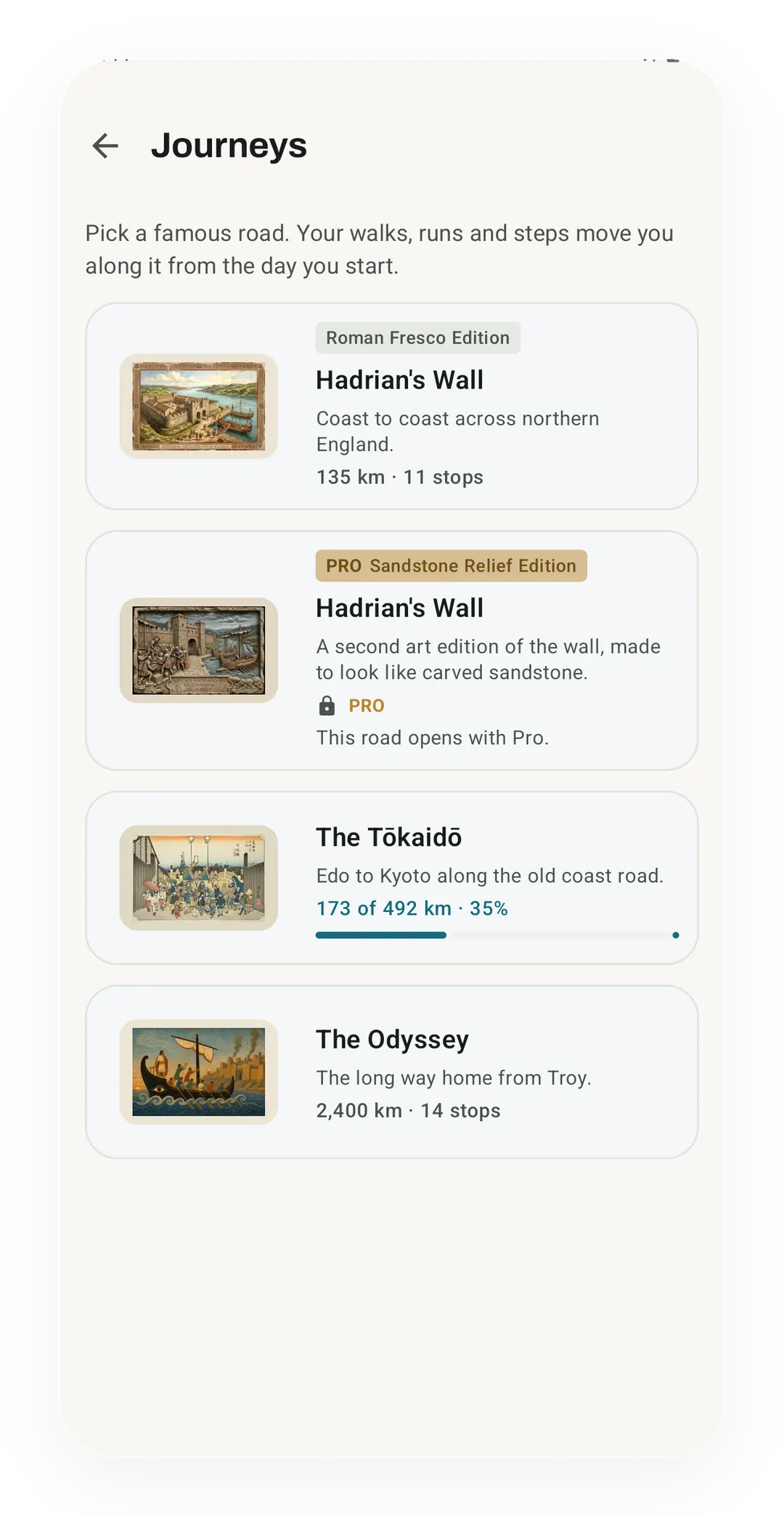
Journeys gives your walks and runs a destination. A road starts at zero on the day you pick it, so what you logged before that day stays in your history and does not count toward the road. Hadrian’s Wall is the shortest of the three roads at 135 km. The Tōkaidō stretches to 492 km, with Hiroshige’s prints at all 55 stops. The Odyssey is a longer undertaking at 2,400 km, a chosen distance for following the voyage from Troy to Ithaca.
Your tracked runs and walks count, along with steps outside those sessions. Pick which sources you want under What counts. Gym work is an optional addition, with its conversion rate stated before you turn it on and its contribution kept separate from walking distance.
The stops give you a reason to look closer. There are pictures to open and short accounts of the places behind them, including what Hiroshige chose to show in each Tōkaidō print. Four preview pictures help you choose a road; most wait until you arrive. A reached stop can become a postcard to share.
Each road has a drawn map that works offline. The Odyssey also tells you how certain its locations are, because a known archaeological site and a proposed setting from a poem deserve different labels. Switch to Real if you want world map tiles, which need a connection to load.
The three roads are free throughout. Pro adds the Sandstone Relief edition of Hadrian’s Wall, with carved-stone artwork over the same route. There is no deadline on either edition. You can pause a road, come back to it, or walk a finished one again while keeping the earlier finish.
A Today card that shows what you will train
The Today card is redrawn on Free and Pro. It names what the workout trains and gives you one Start button, and its preview lists every exercise along with the full reason for the pick. On Free, Today now follows the Rotation Groups you build, including the weekly count and the routines that are due. On Pro, the body figure colours only the muscles this workout trains.
Choose how you write down a set
Some people want barely anything between them and the numbers. Others want an obvious box to tap, or columns they can read down at a glance. The session screen now gives you that choice.
Clean Inline keeps weight and reps as simple text until you tap to edit. Compact Pills puts the values in rounded capsules. Tabular Grid lines everything up under column headings, with previous performance alongside your current numbers.
All three edit sets in place on Today and in the full session view. If you track rate of perceived exertion (RPE), meaning how hard the set felt, or reps in reserve (RIR), those fields can sit with weight and reps. The effort you logged stays visible after you finish the set.
The familiar FitNotes-style flow is still there too: open one exercise, work through its sets, and keep its history close by. Turn off inline editing if that is how you prefer to train. See the layouts and how to switch between them.
Find a program from the week you actually have
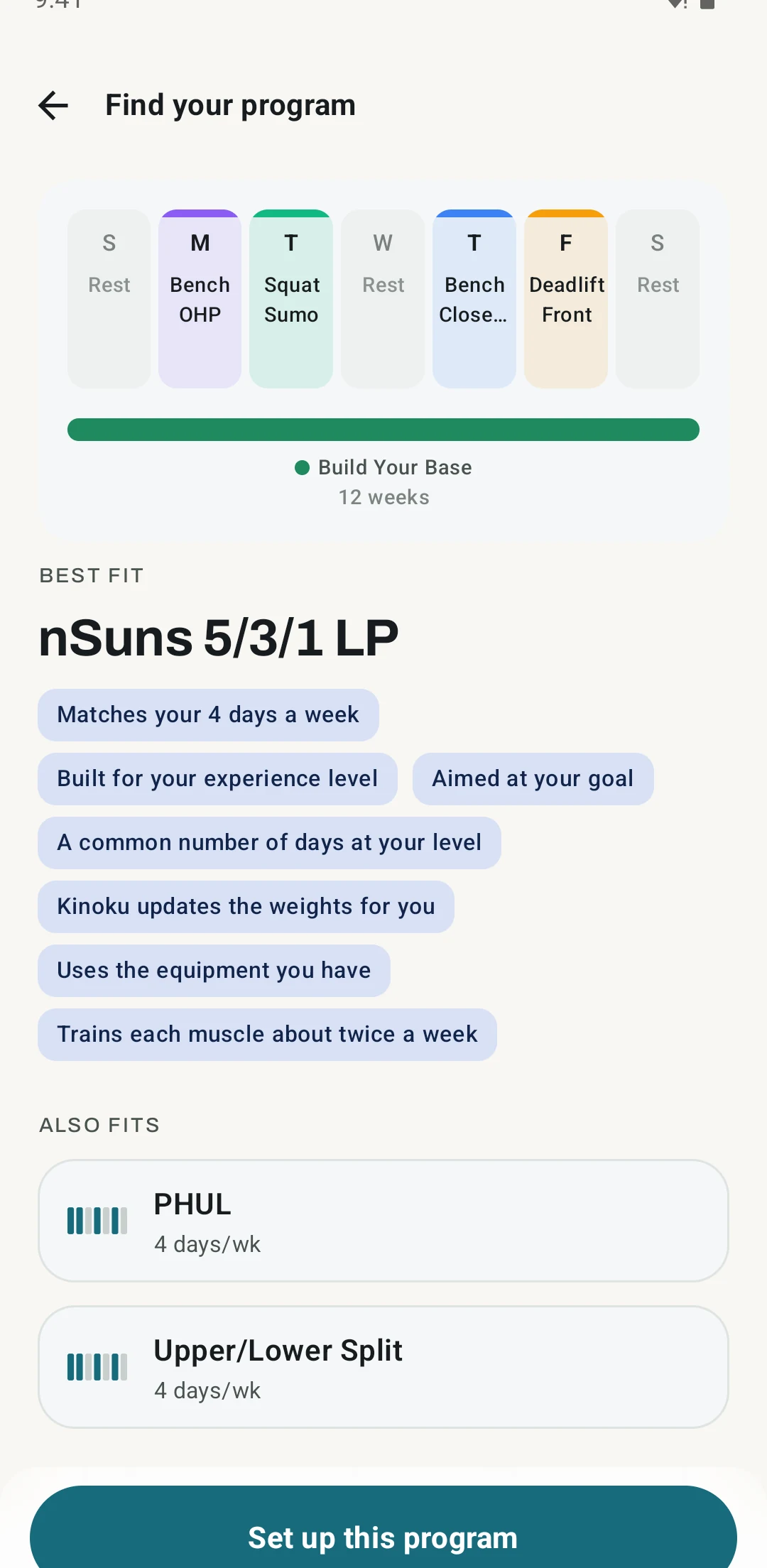
Open the program finder and tell it your experience, goal, equipment and available days. It lays a recommendation over your week, explains why it fits, and names a trade-off. You can compare two alternatives before starting.
Ten programs join the catalog, including Classic 5×5, Reddit PPL (push, pull, legs), a Greyskull-style progression, PHAT (Power Hypertrophy Adaptive Training), and five- and six-day nSuns plans. There are more options for home training too, including Dumbbell Stopgap, Dumbbell PPL and the Bodyweight Recommended Routine. The finder and the built-in programs are free.
PHUL (Power Hypertrophy Upper Lower) can now progress its four power lifts from the training maxes you enter. A program scheduled for later shows its first date and upcoming sessions, so the plan is visible before day one.
Named programs such as 5/3/1 and Classic 5×5 also get a Program settings screen. You can change the training days, the lift maxes and the size of each weight jump there, and move the start date while the program has not begun.
Keep a form video one tap away
Save a video link on any exercise and it shows as a thumbnail you can tap to watch. Copy a YouTube link and Paste link saves it in one tap, or share a video from YouTube straight to Kinoku and pick the exercise it belongs to. Between sets, the video sits under your personal best on the workout screen. Thumbnails and titles come from YouTube, so they need a connection, and the Fetch video metadata switch turns those lookups off.
Bring outside sessions into your history
Kinoku can now import runs, walks and rides that other apps have written to Health Connect. Allow exercise and distance access, then enable Import Workouts. Availability depends on the recording app actually writing those sessions to Health Connect; this is not a direct connection to every watch or training service.
Treadmill runs and indoor rides come in as well. Turning Import Workouts off stops the imports, including during Sync Now, and activity types Kinoku does not track are left out instead of being filed as runs.
A little more of Kinoku on your home screen
Two new widgets join Today, Progress and Quick Start. Kinoku Rings brings together your score, daily steps and weekly workouts. Muscle Map shows which muscles you trained in the last seven days, with recovery colours available through Pro.
Progress also has a free Road view for your active Journey. These let you check something useful without opening the app. Full details on the lock screen remain a choice you make per widget.
A first run that asks what you train for
A new install now opens with a redrawn setup, where each choice has its own colour and a small picture. Pick the Journeys or Walking focus and Quick Start leads with Start a journey, with phone step counting offered just above it. For your first two weeks, a Getting started list on Today ticks off each step once you have done it, and one tap hides the list.
Smaller things you will notice mid-session
The run screen gives more space to the map, with stats in a strip you can pull up. Pausing no longer zooms the map away from where you left it. The exercise editor asks before discarding unsaved changes, and it now links directly to the exercise’s instructions.
A second planned workout stays available after you finish the first. Widgets follow the light or dark appearance chosen in Kinoku. Assisted bodyweight moves keep their assistance values visible after the set is done. Tapping a later plan in the Calendar now opens its menu instead of starting a workout dated that day.
The full changelog covers the rest. Kinoku is still Android-only, and your training history stays on your device rather than syncing through a Kinoku account. To move it to another phone, take a backup with you.
Inside Kinoku
The app surfaces behind this story
 Open full-size image ↗
A road that starts the day you do
The Journeys picker lists Hadrian's Wall, the Tōkaidō and the Odyssey, and from the day you start a road your walks, runs and steps move you along it. All three roads are free, and the Sandstone Relief art edition of the wall is Pro.
 Open full-size image ↗
A program that fits the days you have
The finder explains its recommendation and shows how the sessions fit into your week.
Related features
Walk Hadrian's Wall, the Tōkaidō or the Odyssey with your everyday distance. Reach a stop and uncover its picture.
A Today card shows the workout you are due for, the muscles it trains and a Start button. Free automatically spots your A/B/C rotation, follows the Rotation Groups you build, and lists routines that are due. Pro shades that body by how fresh each muscle is, and adds an easy-day pick when your sleep or HRV is low.
Every set, one tap. Track how hard each set felt, your rest timers, set types, and notes.
A 4-phase planning stack. The builder, all 25 templates, named programs with auto-progression, the custom model, and unlimited active programs are free. Pro adds volume targets, readiness tuning, and auto set changes.
Kinoku reads and writes Android Health Connect data without passing it to a cloud. Period flow import is a Pro feature and read-only. Kinoku never writes cycle data back to Health Connect.
Five Android widgets for the home screen: today's next move, one progress signal, quick actions, your score and goals as three rings, and the muscles you trained in the last 7 days. The core is free; Pro adds the deeper views and Quick Log.
Live pace, splits, a route map, and audio cues. Your run record is not uploaded to Kinoku; map tiles load when you view maps, and weather is a clear opt-in.
Try Kinoku
Core tracking works offline. No mandatory account. No Kinoku-hosted training-history cloud.
Get on Google Play →