

Kinoku 1.6: timers for timed workouts, two runs side by side
Free For Time, EMOM and AMRAP timers, a run compare that shows where you gained or lost time, and heart rate for each set on the watch. Kinoku 1.6.0.
In Kinoku 1.6 you can run a whole timed session on one clock: pick For Time, EMOM (every minute on the minute) or AMRAP (as many rounds as possible), and tap Round done as you finish each round. The timers are free, and the cues keep playing with the phone locked.
The timers lead this release, next to a run compare that shows where you gained or lost time and import guides for people coming from another app. You will also find notes that sit above your sets, a per-hand switch for dumbbells, and a heart rate reading for every set you log on the watch.
Timers for timed workouts
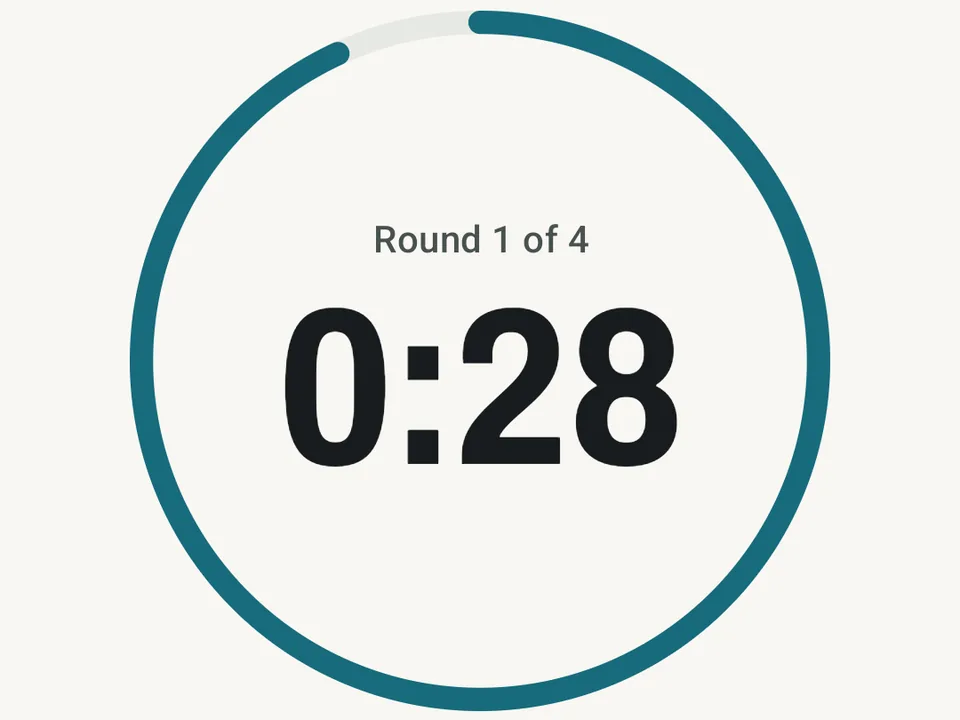
Pick a timer in the routine editor, or tap Start a timer in the Scene panel on Today when you have no routine in mind. For Time counts up until you finish or hit a cap you set, EMOM starts the work at the top of each interval, and AMRAP counts down while you repeat the round. Each tap on Round done ticks off that round’s sets and saves a split, or in EMOM marks the round as on time.
When you finish, the result stays on the session, the Today card and the recap, like “6 rounds + 9 reps” or “14 of 16 on time”. All three workout timers are free. Circuit mode, the work and rest countdown, stays part of Pro.
Race-style training gets a few more pieces. Sled Push, Sled Pull, Wall Ball and Sandbag Lunge now take a time as well, through two new log types: Weight, Distance & Time and Weight, Reps & Time. Rowing machine and ski erg sets show your split per 500 m, as the machine’s own screen does, and the Graph tab keeps your best time at each effort you repeat. A new free starter pack, Fitness Race Prep, adds a station strength day, 40 minutes of runs and stations for time, and a 16-minute EMOM.
Two runs side by side
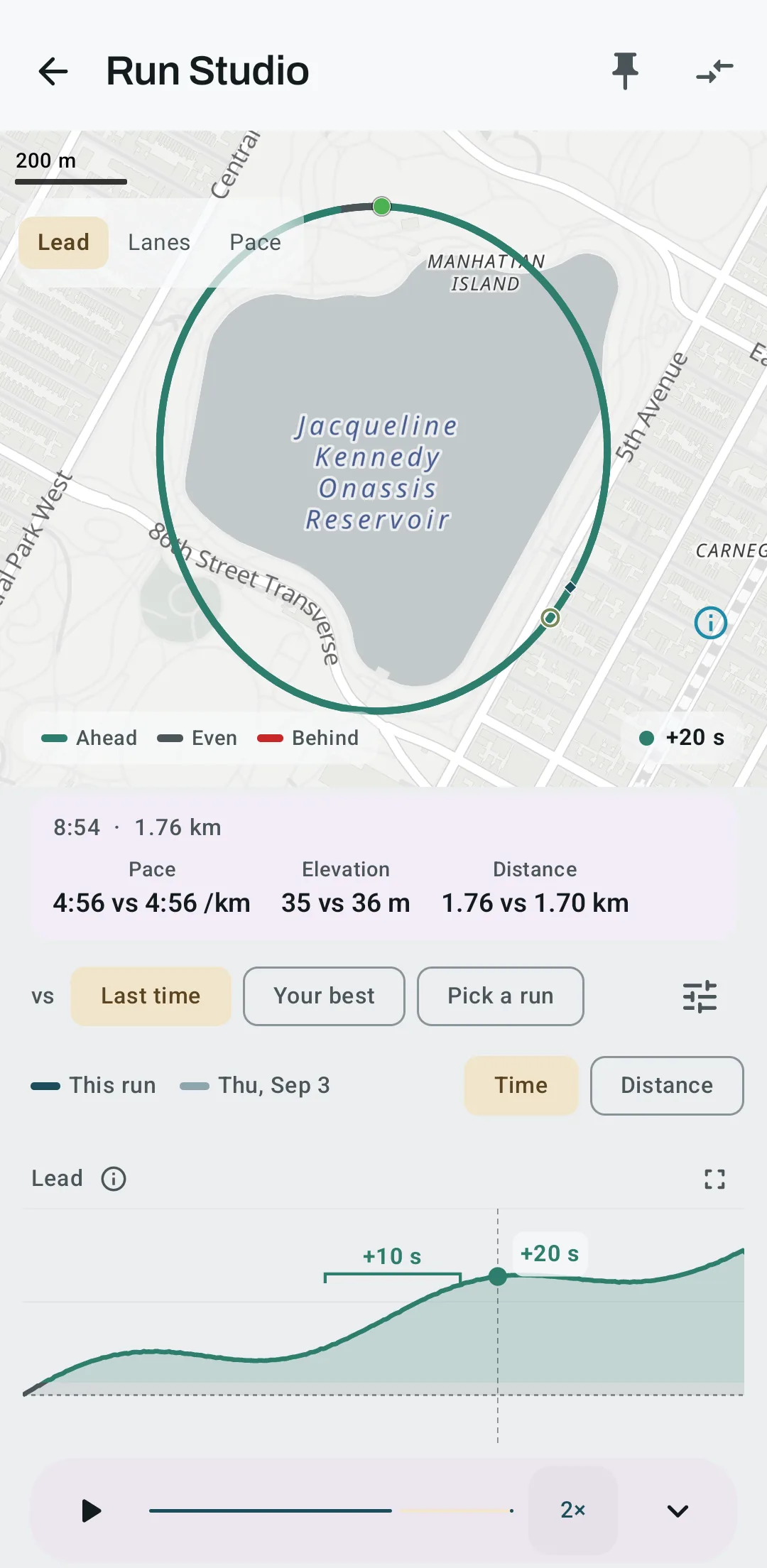
Comparing two runs in Run Studio now starts with where you gained or lost time. A Lead chart shows the seconds you were ahead or behind along the route, and it marks the 500 m where the gap changed most when that change beats GPS noise. Last time and Your best are one tap each, or you can pick any run.
On a route you run often, the map colors your line by who was ahead, or it draws the other run beside yours like the next lane, with a hollow ring for the other runner at the same moment. The Similar Runs card also gets a row that opens the compare on the map. The compare is part of Pro.
Two parts of Run Studio are free. Turn your phone sideways, or tap the expand icon on a chart, and you get one big chart with a small map beside it. And if you do not have Pro, the locked compare and replay now open a short preview first, which races your own runs when you have two on one route.
Coming from another app
Import now asks which app you are coming from. Hevy, Strong, FitNotes and Strava each get short steps for getting the export out of that app and into Kinoku, and the Strava steps say up front that watch files are not read yet. The first-run setup asks the same question, so Quick Start and the Today import card point at the app you name.
After the import, Kinoku can offer to log sets the way your old app did, such as grid rows or an effort score (RPE, the rate of perceived exertion). It lists each change, and nothing changes until you tap Apply. The finish screen shows how many workouts came over and since when.
A few import fixes came with it. FitNotes exports in pounds no longer import at less than half the weight, and Strong 6.2.4 exports now arrive with their weights, distances and workout lengths. Undo on an import now also takes back the day notes, rest days and other records it added.
Notes that sit above your sets
When you open an exercise during a workout, a strip above the set list shows your note for that exercise, or the routine’s note when the exercise has none. Under it, a faded line shows the notes you left on your sets last session, so a reminder like “felt easy, go up next time” comes back when it matters. A tap on the strip opens all of them, and you can edit the exercise note and the routine note right there.
The set note box also shows last session’s note for the same set as a hint. On the watch, the set screen shows your exercise or routine note on one line, and a tap opens both in full. Pinned notes are free.
Weight is per hand
Many people log a dumbbell press as the weight of one dumbbell, which made their volume look like half of what they lifted. A new switch in the exercise editor, Weight is per hand, fixes that for dumbbells, kettlebells and cables. You keep logging the weight of one, and volume counts the pair, in your volume records too.
Weight records and your estimated one-rep max keep the weight you type, so a 30 kg dumbbell press still reads as a 30 kg press. The switch stays off until you turn it on, and it applies only to sets you log after that, so older workouts keep the volume they had. It is free.
Stair machines and your step count
Stair Climber, Stairmaster and Step Mill now log steps and time instead of reps, and a Count picker in the exercise editor sets what a cardio exercise counts. Steps you log on a stair machine with a time add to your daily steps and move you along a Journeys road. When your phone or your watch counted the same climb, the larger number counts and not both.
On the Steps screen you can now correct a day’s count by hand when it is wrong, or take a tracked walk’s estimated steps off. Undo and Change History cover each edit, and Health Connect and your watch never get the correction.
Heart rate for every set on the watch
Gym sets you log on the watch now keep their average and peak heart rate. History shows both under each finished set, such as “Average heart rate 141 bpm, peak 163 bpm”, and the watch’s workout summary shows the session’s average and highest reading.
The watch can also stay awake on your workout screens, with a new switch on the phone’s Watch Companion screen that is off by default because it uses more battery. When a rest ends the watch lights up its screen, and during a rest it shows the time left in a notification with +30s and Skip.
Most of the other watch work is about sets reaching the phone and staying the way you left them. A workout you finish on the watch no longer reopens and loses the sets that had not reached the phone yet, and sets you complete on one device no longer flip back to not done. A slow Bluetooth link or a large exercise library no longer keeps your exercises and routines off the watch. The watch app is free, and voice input on the watch is part of Pro.
Smaller things you will notice
The rest timer shows the whole rest next to the time left, such as 00:42 / 01:30. Replace on an exercise now lists similar moves by how well their muscles match, with equipment chips for when the bench is taken. Ticking off a set gives a light buzz, and with voice cues on the coach tells you when you set a new best km, mile, 5K or 10K during a run.
A run no longer saves thousands of extra kilometres when the phone’s first location fix is out of date, which once turned a test run of about 1.1 km into 4,127 km. Body view in the Exercise Galaxy now plays 569 moves, up from one squat, and Search no longer crashes on some Korean and Japanese results.
The full changelog lists everything else in 1.6.0. Kinoku runs on Android only for now. Your workouts live on your phone with no Kinoku account to sync them, so when you switch phones you carry a backup across.
Inside Kinoku
The app surfaces behind this story
 Open full-size image ↗
A timer for timed work
An EMOM (every minute on the minute) timer on round 1 of 4, with 0:28 on the clock. For Time, EMOM and AMRAP are all free.
 Open full-size image ↗
Who was ahead
A 2.7 km tempo loop against the last run on the same route, on Pro. The route turns the Ahead color where this run led, and at 1.76 km it was 20 seconds up.
Related features
For Time, EMOM (every minute on the minute) and AMRAP (as many rounds as possible) timers that run the clock and save the score with your sets.
A deep look at one run. Pace, heart rate, and climb on linked charts you can pinch to zoom. Tap the route to jump to that moment, and read marks for your peaks, fastest splits, and fatigue points. The whole screen is free. Pro adds replay, ghost-compare against another run, your own notes, and still-frame MP4 export.
Bring your Strava history with no login token. Choose the Strava archive ZIP once; Kinoku reads activities.csv and supported route files from it on your phone. Kinoku never touches Strava's servers.
Every set, one tap. Track how hard each set felt, your rest timers, set types, and notes.
1,300+ built-in exercises with muscle data and unlimited custom moves are free. Pro adds custom form photos and assisted sorting.
Daily steps, streaks, brisk minutes, and an hour-by-hour view of how you moved.
A real watch app for workouts, runs, steps, tiles, and watch face data.
Walk Hadrian's Wall, the Tōkaidō or the Odyssey with your everyday distance. Reach a stop and uncover its picture.
Try Kinoku
Core tracking works offline. No mandatory account. No Kinoku-hosted training-history cloud.
Get on Google Play →