

Best Fitbit alternatives (2026)
Six Android apps for people leaving the Fitbit app or band, with each maker's own words on accounts, subscriptions, sleep and Health Connect.
The Fitbit app is now Google Health and needs a Google account; Garmin Connect, Samsung Health and Zepp come with their makers' watches, Gadgetbridge runs many bands with no maker's app, and Kinoku and Pacer count steps on the phone with no band.
At a glance
| App | Best for | Better than Fitbit at | Main trade-off |
|---|---|---|---|
| Gadgetbridge | Privacy-minded owners of a supported band who want no maker's app or cloud | Open source with no internet permission, and it can write band data to Health Connect | No Fitbit on its list, it installs from F-Droid, and some bands need the maker's account once to pair |
| Garmin Connect | People moving to a Garmin watch who want its paid layer to stay optional | Garmin says every feature that was free in Garmin Connect stays free | It needs a Garmin device, and its Health Connect link is not stated on a page we could open |
| Kinoku | People who want steps, GPS runs and gym sets on the phone, with no band and no account | Reads a band's sleep and steps from Health Connect next to a full gym and run log | It is an app, not a band: it records no sleep or all-day heart rate itself |
| Pacer | Walkers who want a free phone step counter that can also sync a Fitbit | Counts steps with the phone alone, and names Fitbit among the apps it syncs with | Its listing carries the Contains ads label and names no sleep tracking |
| Samsung Health | Galaxy phone and Galaxy Watch owners who want steps, workouts and sleep in one app | Sleep detail with a Galaxy Watch, and a two-way sync with Health Connect | A Samsung account is required, and some phones are not supported |
| Zepp | People moving to an Amazfit watch or band who want the core app free | Its listing says you never pay to see what your Amazfit device tracked | You register an account, and the listing carries the Contains ads label |
Publisher disclosure
Kinoku, made by Dreamsoft Works, writes and publishes this page, and Kinoku is one of the apps on it. Every fact about another app, and every Google statement about Fitbit and Google Health, is quoted from a page that company publishes, opened on October 27, 2026. We ran no device test for this page. We give no score. The apps are grouped by what their own pages say they are built around, and every label points at a quoted sentence.
Quickstart
The Fitbit app is now Google Health, and Google says a Fitbit login stopped opening it after May 19, 2026. Garmin, Samsung and Amazfit sell watches with their own apps, Gadgetbridge runs many bands with no maker’s app, and Kinoku and Pacer need no band. Groups follow each app’s own pages, A to Z, with no score.
What changed in the Fitbit app?
Fitbit’s Android app now opens as Google Health. Its listing says “The Fitbit App is now Google Health”, and it syncs your Fitbit, a Pixel Watch, other health apps and, in some countries, your medical records. Google calls its sleep feature a coach that will “analyze your nightly sleep stages, identify long-term trends”, and that is a real strength of the band and app together.
Three statements on Google’s help pages and app listing explain why people search for another option.
- A Google account, with a date on it: “After May 19, 2026, you can no longer access Fitbit with your Fitbit account.” Google adds that a Google account is now required to sign up for the app and to activate newly released Fitbit and Pixel devices.
- A window for old data: For an account that was never moved, Google said you could download or delete your data before it began “processing data deletions on July 15, 2026”, a date now past.
- A paid layer: The listing says “Some features require Google Health Premium subscription (sold separately)”, and the coach is “Available in certain countries with Google Health Premium”. We print no Premium price.
None of this stops a Fitbit from working with a Google account. The list below is for anyone who would rather change the band, change the app, or keep the band and add a different training log.
Which Fitbit alternatives need a band?
The six apps here split by what their own pages say they are built around, which also tells you whether you need to buy a new band.
- Built around one maker’s watches: Garmin Connect, Samsung Health and Zepp. Garmin’s listing reviews data from “another compatible Garmin device”, Samsung reads sleep in more detail “with Galaxy Watch”, and Zepp calls itself “The official app for Amazfit”. Each one plays the part Google Health plays for a Fitbit.
- Built for many makers’ bands: Gadgetbridge. It lets you pair a band “without the need for the vendor application”, from a list of brands that does not include Fitbit.
- Built around the phone: Kinoku and Pacer. Both count steps with the phone in your pocket, so neither needs a band, and each can read or sync a band’s data when you have one.
Side by side
Each cell rests on a sentence from the maker’s listing, help page, newsroom or site, and “Not stated” means no page we could open covers it.
| App | Needs a band | Sleep | Account | Health Connect | Paid layer or ads |
|---|---|---|---|---|---|
| Garmin Connect | A Garmin device | Sleep in its health trends | Not stated | Not stated | Connect+ is optional; free features stay free |
| Samsung Health | Not stated for steps; a Galaxy Watch for sleep detail | “with Galaxy Watch” | Samsung account required | Syncs steps, exercise, heart rate and sleep | Optional paid content |
| Zepp | An Amazfit device for most data | “monitors sleep” | You register an account | Not stated | “Contains ads” label; Aura Premium |
| Gadgetbridge | A supported band, not a Fitbit | From the band, where it records it | Not needed day to day | Writes steps, heart readings and sleep | Free and open source |
| Kinoku | No; Wear OS optional | Reads it from Health Connect; records none | None | Reads and writes | No ads; Pro for health trends |
| Pacer | No | Not stated | “No website login needed” | Not stated | “Contains ads” label |
Each app, in its own words
Garmin Connect
Best for: People moving to a Garmin watch who want its paid layer to stay optional.
Garmin Connect is the phone app for Garmin watches and bands, and most of what it shows comes from the device on your wrist.
- What it does well: Once paired with “another compatible Garmin device”, it lets “you review your tracked activities and health metrics”. You can “Review trends in health metrics like your heart rate, steps, sleep, stress, menstrual cycle, weight, calories and more”, and “Create customized workouts and courses”. It syncs with apps such as MyFitnessPal and Strava.
- What its pages say about cost: Garmin’s newsroom says “All existing features and data in Garmin Connect will remain free.” Its paid plan, Garmin Connect+, adds insights “powered by AI”, training guidance and more LiveTrack features. The release prints two prices, so this page prints neither.
- Where it is the better pick: A Fitbit owner who is buying a Garmin watch and wants sleep and heart trends with no required fee.
- Where Garmin Connect differs: It needs a Garmin device for most of its data. Garmin’s support site did not open for us, so this page states no account rule and no Health Connect link for it. Official listing: Google Play.
Samsung Health
Best for: Galaxy phone and Galaxy Watch owners who want steps, workouts and sleep in one app.
Samsung Health is Samsung’s own health app, and it is the companion for a Galaxy Watch.
- What it does well: It lets you manage daily steps and activity time, records “running, cycling, swimming, etc.”, and lets you “Monitor your sleep patterns in more detail with Galaxy Watch.” Samsung’s developer page lists steps, exercise, heart rate and sleep as data kept in sync with Health Connect.
- What its pages say about limits: Since version 6.15, Samsung requires a Samsung account sign-in to use the app, going by its US support page. The listing itself notes “Tablets and some mobile devices are not supported”, and a paid subscription you can skip opens some content.
- Where it is the better pick: A Fitbit owner who already has a Galaxy phone and is moving to a Galaxy Watch.
- Where Samsung Health differs: It trades a Google account for a Samsung one, so it does not answer a wish for no account at all. Official listing: Google Play.
Zepp
Best for: People moving to an Amazfit watch or band who want the core app free.
Zepp is the companion app for Amazfit watches, bands and rings.
- What it does well: Its listing says it captures “daily activity such as steps and calories burned”, along with pace, distance, strength logs and recovery insights. It “monitors sleep with precision sensors” for a recovery read. On cost, it says “You won’t need to pay to view data tracked by your Amazfit device, upgrade software, or import maps.”
- What its pages say about limits: Amazfit’s help page lists “6 methods to register an account”, from a Xiaomi or Google account to email. The listing carries the Contains ads label, and “Zepp Aura Premium Subscription is available for a monthly or yearly fee”.
- Where it is the better pick: A Fitbit owner who wants a band with a free core app and does not mind an account and ads.
- Where Zepp differs: We found no Zepp page that mentions Health Connect, so this page makes no claim about it. Official listing: Google Play.
Gadgetbridge
Best for: Privacy-minded owners of a supported band who want no maker’s app or cloud.
Gadgetbridge is an open-source app that talks to a band or watch in place of the maker’s own app.
- What it does well: Its F-Droid page says you can use a fitness tracker “without the vendor’s closed source application and without the need to create an account”. Its FAQ says the app lacks the internet permission, “which makes it impossible to send any data to the internet.” Its docs list steps, heart rate variability, resting heart rate and sleep among the data it can write to Health Connect.
- What its pages say about limits: Some Amazfit and Xiaomi bands need a pairing key from the maker’s server, and those steps “require you to create an account with your gadget’s vendor’s website and/or download a proprietary app.” After that, the FAQ says an account is not needed for daily use.
- Where it is the better pick: Someone leaving Fitbit over privacy who will buy a band from Gadgetbridge’s list and wants the data to stay on the phone.
- Where Gadgetbridge differs: Its watch list names brands such as Amazfit, Garmin, Pebble and Xiaomi, with no Fitbit model, and it installs from F-Droid, an open-source app store. Official listing: F-Droid.
Kinoku
Best for: People who want steps, GPS runs and gym sets on the phone, with no band and no account.
Kinoku is a private training app for Android, and it is an app rather than a device. It keeps steps, GPS runs and gym sessions in one record on the phone, with no account to make.
- What it does well: Kinoku counts steps on the phone for free, with a goal ring, streaks and records. GPS runs are free with pace, splits and a route map, and the gym log holds sets, reps and routines with no cap on routines. With a band, Kinoku reads its steps, sleep, resting heart rate and heart rate variability from Health Connect for free, and those feed the free Kinoku Score.
- What its pages say about limits: The Health Dashboard snapshot of those readings is free, while sleep analysis and the longer trends are Pro. The run map needs a connection to load its tiles, and Android’s own device backup can copy the record to your Google account when you turn that on.
- Where it is the better pick: A Fitbit user who wants a training log with no account, either beside the band or with no band at all.
- What Kinoku does not do: Kinoku is not a band, so it records no sleep or all-day heart rate of its own and reads no blood oxygen. It has no Fitbit importer, no chat coach and no sync between two phones, and the iPhone version is still in the works.
Pacer
Best for: Walkers who want a free phone step counter that can also sync a Fitbit.
Pacer is a walking app that turns the phone in your pocket into a pedometer.
- What it does well: Pacer’s listing promises to count steps “automatically if your phone is with you”, and adds “No website login needed.” It suggests you “Try Pacer Pedometer first before you buy a Fitbit or other tracker”, and it records outdoor workouts on a map with GPS.
- What its pages say about limits: Google Play marks the listing “Contains ads”, while Pacer calls its tracking features free. It names no sleep tracking and no gym log.
- Where it is the better pick: A Fitbit owner who mostly watched the step count and wants to try the phone alone before buying any band.
- Where Pacer differs: Its listing says Pacer “syncs with Fitbit, Garmin, Google Fit, Samsung Health” and other step apps, so it can sit beside a band you keep. Official listing: Google Play.
Keeping your Fitbit and changing the app
You can keep the band and still do your training log somewhere else, because Health Connect lets apps on the phone share data. Google’s help page says that once the two are linked you can “share data from Google Health to those other apps”. Its table of data Google Health can write includes steps, exercise, sleep stages, resting heart rate and heart rate variability.
Here is how that would reach Kinoku, going by the two apps’ own lists.
- Steps: Kinoku reads the steps Google Health writes. When the phone is counting too, Kinoku keeps one count per minute, so a walk is not added twice.
- Sleep and heart readings: Sleep, resting heart rate and heart rate variability feed the free Kinoku Score and the free dashboard snapshot, which includes a seven-day trend. Sleep analysis and trends longer than seven days are Pro.
- Workouts: Runs, walks and rides from the past seven days come in as Kinoku workouts. A gym session you logged on the band does not arrive as sets.
- The other way: Kinoku writes finished workouts to Health Connect, plus a step estimate for each GPS run, and Google’s table lists exercise and steps among what Google Health reads.
We have not tested Google Health and Kinoku together on a device, so this section rests on the two apps’ published lists. Google’s page also says data that Google Health takes from Health Connect “is stored in your account”, which is worth knowing before you link them.
When is Google Health still the better pick?
Google Health stays the simpler choice in three cases, and Google’s pages give the reasons.
- You like the band and the coach: Google’s listing describes a coach that reads your sleep stages and answers follow-up questions, in the countries where Premium offers it.
- You want one place for medical records: The listing names medical records next to Fitbit and Pixel Watch data, in select countries.
- You moved your account already: Google says you keep all the history you chose to move, so staying costs you nothing on that front.
For a Fitbit owner who lifts or runs, adding a training app through Health Connect is often a smaller step than a full switch, since the band and its sleep tracking stay where they are.
How this list was checked
Every fact about another app comes from a page its maker publishes, opened on October 27, 2026.
- Google’s statements: Each sentence about Fitbit and Google Health is quoted from Google’s listing or the Google Health help centre, including the account date and the Health Connect table.
- Other apps: Each fact is a sentence from a Google Play listing, an F-Droid page, a help page, a newsroom release or the app’s own site. We ran no device test, so a cell with no sentence reads “Not stated”.
- Kinoku: We checked Kinoku’s lines against the app’s code, above all what it reads from Health Connect, how far back, and which views are Pro.
- Order: Apps built around one maker’s watches come first, then the app for many bands, then the phone apps, each group sorted A to Z, and no app paid to appear here.
Frequently asked questions
Do I need a Google account to keep using my Fitbit?
Yes. Google’s help page says that after May 19, 2026, a Fitbit login no longer opens the app, and the app is now called Google Health. A Google account is also needed to sign up for Google Health and to activate newly released Fitbit and Pixel devices. History you choose to move comes with you.
What happens to Fitbit data that was never moved to a Google account?
Google’s help page says it starts processing deletions of that data on July 15, 2026, and that the deletion process takes some time. That date has passed, so data that was never moved may already be gone. None of the apps on this page says it reads a Fitbit download, Kinoku included.
Is there a Fitbit alternative with no subscription?
Several have a free core and an optional paid layer. Garmin says every feature that was free in Garmin Connect stays free beside its paid Connect+. Zepp’s core is free, with Zepp Aura Premium on top. Gadgetbridge is free and open source, and Pacer calls its tracking free while carrying ads. Kinoku’s free plan has no ads, and Pro adds deeper trends.
Can I keep my Fitbit and use a different app with it?
Yes, two ways appear on these pages. Pacer’s listing names Fitbit among the apps it syncs with. Google’s help page says Google Health can share its data through Health Connect, and its list includes steps, sleep and heart readings. Kinoku reads those from Health Connect for free. We have not tested Google Health and Kinoku together on a device.
Can Kinoku import my Fitbit history?
No. Kinoku has no Fitbit importer and does not read Google’s data download. On first connect it reads up to 30 days of daily readings from Health Connect, or a year if you allow older reads, plus the past week of runs, walks and rides. Google’s page does not say how far back Google Health writes, so older Fitbit days may not appear.
Which Fitbit alternative tracks sleep?
The apps tied to a watch or band do. Garmin Connect shows sleep trends from a Garmin device, Samsung Health reads sleep in more detail with a Galaxy Watch, and Zepp monitors sleep through an Amazfit device. Gadgetbridge records what a supported band measures. Kinoku shows sleep that another app wrote to Health Connect and does not record it, and Pacer’s listing does not mention sleep.
Is there a Fitbit alternative that works without an account?
Kinoku has no account at any point. Pacer’s listing says no website login is needed to start counting steps. Gadgetbridge says an account is not needed for daily use, though some bands need the maker’s account once to make a pairing key. Samsung Health and Google Health require their makers’ accounts, and Zepp’s help page lists six ways to register one.
Does Gadgetbridge work with a Fitbit?
Not on the list we read. Gadgetbridge’s site lists watch brands such as Amazfit, Garmin, Pebble and Xiaomi, and no Fitbit model appears there on October 27, 2026. So a Fitbit owner who wants Gadgetbridge would pick a new band from its list. It installs from F-Droid, an open-source app store, and we found no Google Play listing for it on its own site.
Which Fitbit alternative works with no band at all?
Kinoku and Pacer both count steps with the phone you already carry. Pacer even suggests trying it before you buy a Fitbit or another tracker. Kinoku adds GPS runs and a gym log in the same record, and its free Wear OS app is there if you later want a watch. Samsung Health also lists daily steps among what it tracks, once you sign in.
Which of these apps log gym workouts?
Kinoku logs sets, reps, weights and routines, with no cap on routines on the free plan. Zepp’s listing names strength logs among the training data it captures, and Garmin Connect lets you build custom workouts for a Garmin watch. Samsung Health records running, cycling and swimming. Gadgetbridge and Pacer do not describe a set-by-set gym log on the pages we read.
Which of these apps share data through Health Connect?
Four say so on their own pages. Samsung’s developer page names steps, exercise, heart rate and sleep as shared both ways with Health Connect, and Gadgetbridge lists steps, heart readings and sleep it can write there. Google Health’s help page lists what it reads and writes. Kinoku reads steps, sleep and heart readings and writes finished workouts and run step estimates. Garmin’s, Zepp’s and Pacer’s pages we read do not say.
What does Kinoku not do that a Fitbit does?
Kinoku is an app, not a band, so it records no sleep or all-day heart rate on its own. It shows those only when a band’s app writes them to Health Connect, and it does not read blood oxygen at all. It has no chat coach like Google Health’s, no iPhone app yet and no sync between two phones, and its sleep analysis and longer health trends are Pro.
Related pages
- Best Google Fit alternatives: The same move for Google Fit users, where Google Health is one of the options.
- Best Samsung Health alternatives: For Galaxy owners who want no Samsung account or a separate gym log.
- Which Android fitness app works without a smartwatch?: What each app counts and records with only a phone.
- Free workout trackers with Health Connect: What each tracker reads from and writes to Health Connect.
- Best privacy-focused fitness apps for Android: Each app’s own data label, side by side.
- Health Connect: Every kind of data Kinoku reads and writes.
- Kinoku Score: How sleep and heart readings feed the daily score.
- Steps: Phone, watch and Health Connect steps merged into one daily count, with the free and Pro views.
Which one fits you
- Choose Garmin Connect if you are buying a Garmin watch, you want sleep and heart trends from it, and a paid layer you can skip.
- Choose Samsung Health if you own a Galaxy phone or Galaxy Watch, and a Samsung account is fine with you.
- Choose Zepp if you are moving to an Amazfit watch or band, and an account and ads are fine.
- Choose Gadgetbridge if your band is on its supported list, you want no maker's cloud, and you install apps from F-Droid.
- Choose Kinoku if you want a training log for steps, runs and lifts with no account, with or without a band beside it.
- Choose Pacer if you mostly walk, you want to count steps with the phone alone, and ads do not bother you.
How this page is checked. Every fact about another app on this page comes from a page that app publishes, which we could open and quote on October 27, 2026. The sources, with the exact sentence each fact rests on, are listed just above. Every Kinoku fact is tied to the shipping app's code. The page carries no score; the apps are grouped by what their own pages say. If a fact here has gone stale, the support page is the fastest way to tell us.
Kinoku in practice
Where this shows up in the app
 Open full-size image ↗
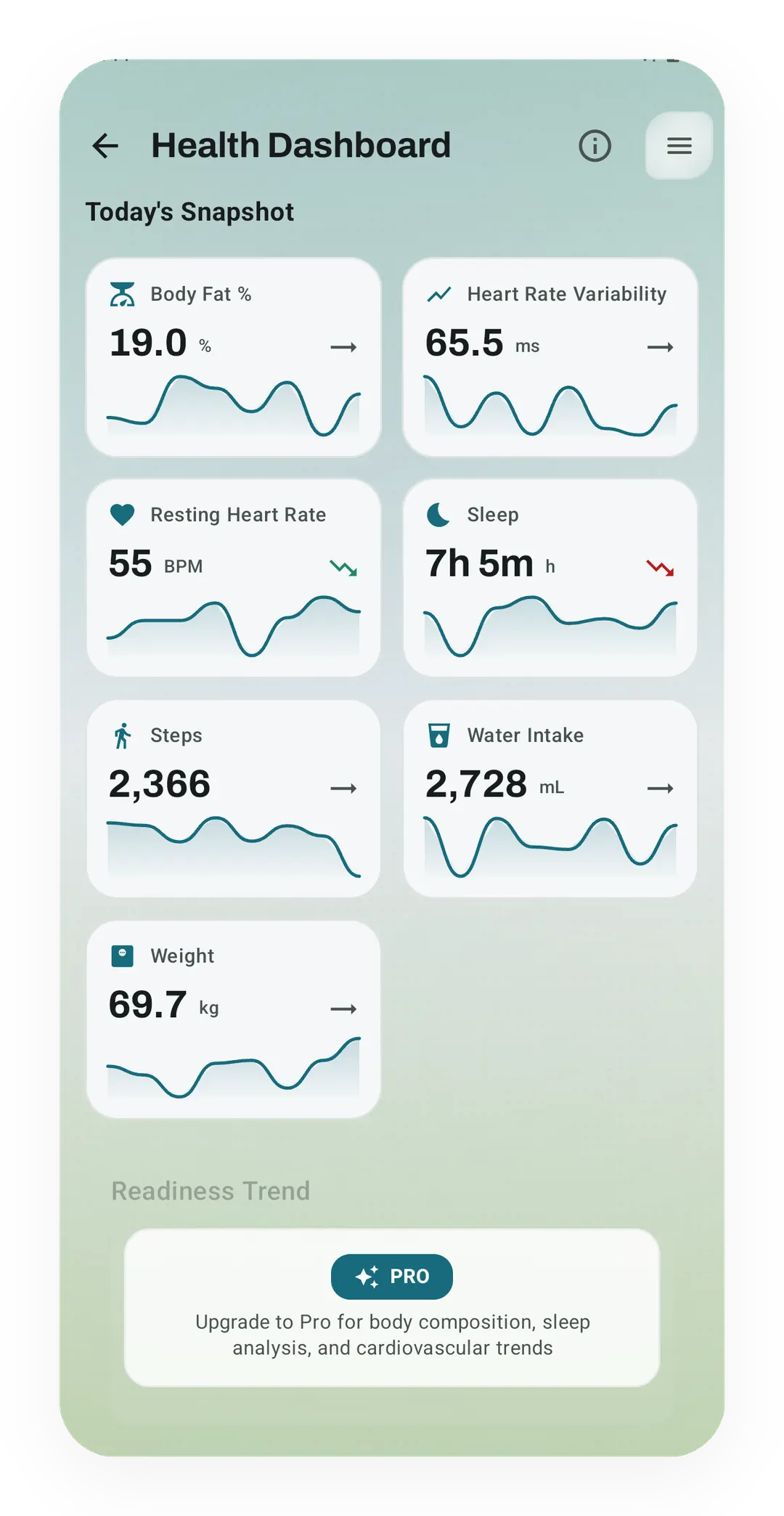
A band's readings in the free snapshot
Real app capture, free tier. The Health Dashboard snapshot shows the latest sleep, heart rate variability, resting heart rate and steps from Health Connect, each with a small trend line. Sleep analysis and the longer trends under it are Pro.
One of the apps on this page
Kinoku is free to install
Core tracking works offline, with no account. An export from the app you use today can come along.
Android only for now, with an iPhone version in the works. Some depth is paid, and the pricing page says which parts.
Related features
Kinoku reads and writes Android Health Connect data without passing it to a cloud. Period flow import is a Pro feature and read-only. Kinoku never writes cycle data back to Health Connect.
Daily steps, streaks, brisk minutes, and an hour-by-hour view of how you moved.
Once Kinoku has enough data, the Kinoku Score sums up your recent training, recovery, and health signals. Until then, it shows a learning state instead of a made-up number.
A real watch app for workouts, runs, steps, tiles, and watch face data.