

Which Android fitness app works without a smartwatch? (2026)
Nine Android apps checked against their own pages on one question: which of them count steps, record a run and log your lifts with just your phone and no watch?
With no smartwatch, Kinoku is the one app here whose own pages describe all three jobs on the phone alone, free: it counts steps, records GPS runs and logs lifts set by set. Google Fit, Google Health, Pacer and Samsung Health describe steps and runs from the phone, and Hevy and Strong log lifts.
At a glance
| App | Best for | Better at | Main trade-off |
|---|---|---|---|
| Kinoku | People with no smartwatch who want steps, runs and lifts on just their phone, free and with no account | Steps, GPS runs and gym sets in one free history, with no watch and no sign-up | Android only, and steps count only while the phone is on you |
| Google Fit | Android users who want steps, Heart Points and phone-tracked runs in one journal | Heart Points, and a heart rate reading from the phone camera | Weightlifting is a manual entry, and Google is moving Fit users to Google Health |
| Google Health | Phone users who may buy a Fitbit or Pixel Watch later and want Google's app now | Steps, distance and calories from the phone, plus a walk, bike, hike or run tracker | Phone-only users see two tabs, and logging reps and weights sits under a Premium heading |
| Pacer | Walkers who want a free phone step counter with no website login | Walking groups and daily exercise plans made by trainers | Its listing carries the Contains ads label, and it describes no gym sets |
| Samsung Health | Galaxy phone owners who want steps, route maps, meals and a sleep log with no watch yet | Meal logging, and a sleep time you log on the phone | A Samsung account comes first, and set logging is not described |
| AllTrails | Hikers and trail runners who want to find a trail and follow it on the phone | More than 500,000 trails to search, with navigation on the phone | Offline maps are paid, the listing shows ads, and it counts no steps |
| Hevy | Lifters who want a phone gym log with friends and exercise videos | Following friends' lifts and copying their routines | No steps or runs on its pages, and our test met a sign-up screen |
| Strava | Runners and riders who record with the phone's GPS and want a feed | Segments, leaderboards and a feed of friends' efforts | No step counter on its pages, lifts come from another app, and an account is required |
| Strong | Lifters who want a plain phone gym log with a plate and warm-up calculator | A warm-up calculator and a plate calculator in the gym log | Three free workout templates, an account before use, and no steps or runs |
Publisher disclosure
Kinoku, made by Dreamsoft Works, writes and publishes this page, and Kinoku is one of the apps on it. Every fact about another app is quoted from a page that app's maker publishes, opened on October 21, 2026, apart from one dated emulator observation of Hevy. We give no score. Where the list is ordered, the caption names the measure, and every label points at a quoted sentence.
Quickstart
With no smartwatch, Kinoku is the one app here whose own pages describe counting steps, recording GPS runs and logging lifts set by set on just your phone, free. Google Fit, Google Health, Pacer and Samsung Health describe steps and runs from the phone, and the table caption names this measure, with ties running A to Z.
What can an Android phone track with no watch?
A phone has a step sensor, GPS and a screen you can type on, so it can do three fitness jobs by itself. It counts steps while it rides in your pocket, it records a walk or run with its GPS, and it holds a gym log where you type each set. What it cannot do is read your body, so heart rate, sleep stages and overnight readings stay with a watch or a ring.
Each app is placed by how many of those three jobs its own pages describe with no watch and no paid plan.
- All three: Kinoku. It counts steps with the phone’s sensor, records GPS runs and logs each lifting set with weight and reps, all on the free plan.
- Steps and runs: Google Fit, Google Health, Pacer and Samsung Health. Each describes counting steps and recording a walk or run from the phone, and none describes logging a free gym set with reps and weight.
- One job: AllTrails and Strava record outdoor activity with the phone’s GPS, while Hevy and Strong are phone gym logs.
When we searched this question on October 21, 2026, the results were general app lists from tech sites, and none was titled with the question, which is why this page answers it directly.
Side by side
Each cell rests on a page the app’s maker publishes, and “Not stated” means none of the pages we opened say either way.
| App | Steps on the phone | Run or walk on the phone | Lifts set by set | Account | Watch app | Paid layer or ads |
|---|---|---|---|---|---|---|
| Kinoku | Yes, free | GPS runs, free | Yes, free | None | Wear OS, optional | Pro adds step trends and analytics; no ads |
| Google Fit | “Steps goal” | Speed, pace and route from the phone | Weightlifting added by hand | Google account | Wear OS | Not stated |
| Google Health | Steps, distance, calories | “Walk, Bike, Hike, or Run” | Under a Premium heading | Google account | Fitbit, Pixel Watch | Premium for some features |
| Pacer | “free step counter” | GPS, on a map | Not stated | “No website login needed” | Not stated | “Contains ads” label |
| Samsung Health | Phone sensor | Route map for exercise | Not stated | Samsung account | Galaxy Watch | Optional paid content |
| AllTrails | Not stated | Hike, bike, run or walk | Not stated | Not stated | Wear OS | Plus and Peak; “Contains ads” label |
| Hevy | Not stated | Not stated | Yes | Sign-up screen in our test | Wear OS | “No ads and free”; in-app purchases |
| Strava | Not stated | GPS | Shown when another app sends them | Required | Wear OS | Subscription for premium features |
| Strong | Not stated | Not stated | Yes | Sign-up before use | Not stated | Strong PRO; 3 free templates |
Each app, in its own words
Kinoku
Best for: People with no smartwatch who want steps, runs and lifts on just their phone, free and with no account.
Kinoku is an Android training app that keeps your daily steps, GPS runs and gym sets in one history, and you never sign up for anything.
- What it does well: The phone’s own step sensor counts your day for free, with a goal ring, streaks, records and a 90-day grid. GPS runs are free with pace, splits, a route map and audio cues. Each lifting set carries its weight, reps and set type, so a week of walking, running and lifting reads as one record.
- What its pages say about a watch: None is needed for any of the three jobs. A Wear OS watch is optional, and runs or walks that another watch’s app saves to Health Connect come in as workouts.
- Where it is the better pick: Someone with just a phone who walks, runs and lifts, and wants one free record of all of it.
- What Kinoku does not do: It runs only on Android, and its iPhone version is not out yet. Steps count only while the phone is on you, the map tiles load over the internet, and with no watch a run has no heart rate. Hour-by-hour movement and step trends are Pro.
Google Fit
Best for: Android users who want steps, Heart Points and phone-tracked runs in one journal.
Google Fit is Google’s original activity app for Android, and Google plans to move its users to Google Health.
- What it does well: “Fit will use your Android phone’s sensors or Wear OS by Google smartwatch’s heart rate sensors to record your speed, pace, route, and more.” You see “your daily progress on your Heart Points and Steps goal”, and the phone can detect walks, runs and rides on its own.
- What its pages say about a phone alone: With “all you need is your phone camera”, Fit can measure your breathing rate and your heart rate, which no other app here describes.
- Where it is the better pick: People who want a simple daily journal of steps and Heart Points, and who are fine moving apps later.
- Where it differs: Weightlifting is one of the activities “that Fit doesn’t automatically track”, so you add it by hand with no sets. Google’s blog says Fit users will get an invitation to move their data into the Google Health app later in 2026. A Google account is needed. Official listing: Google Play.
Google Health
Best for: Phone users who may buy a Fitbit or Pixel Watch later and want Google’s app now.
Google Health is what the Fitbit app became, as the first line of its listing says.
- What it does well: Its help page says you can “track your basic activities directly from your phone”, meaning steps, distance and calories burned. With no device paired, “you can use your phone to track a Walk, Bike, Hike, or Run.”
- What its pages say about a phone alone: With no Fitbit or Pixel Watch connected, its help page says the app shows a “focused experience” of two tabs, Today and Health.
- Where it is the better pick: Someone who expects to buy a Fitbit or Pixel Watch and wants their history in Google’s app from the start.
- Where it differs: Logging “your reps, weights, and more” while you follow a workout sits under a heading marked Premium only, and some features need a Google Health Premium subscription. A Google account is required. Official listing: Google Play.
Pacer
Best for: Walkers who want a free phone step counter with no website login.
Pacer is a step counter for people whose main exercise is walking.
- What it does well: Its listing calls it a free step counter that works whenever your phone is with you, and it says “No website login needed.” A GPS tracker draws your outdoor walks and runs on a map.
- What its pages say about extras: Its listing describes walking groups you start with friends and family, and daily plans written by trainers.
- Where it is the better pick: A walker who wants the quickest start, with a group for company.
- Where it differs: The listing carries the Contains ads label, and it does not describe logging gym sets. Official listing: Google Play.
Samsung Health
Best for: Galaxy phone owners who want steps, route maps, meals and a sleep log with no watch yet.
Samsung Health comes on Galaxy phones, and its product page says other Android phones and iPhones can install it as well.
- What it does well: Its listing asks for the activity permission “to count your steps and to detect workouts”, and the location permission is “Used to display a route map for exercise”. You can also log meals and snacks.
- What its pages say about a phone alone: “If you are not using a wearable device, you can check your estimated sleep time on your smartphone after you wake up and log that time as your sleep time.” Other vital signs need a supported wearable such as a Galaxy Watch.
- Where it is the better pick: A Galaxy phone owner who wants steps, routes, meals and sleep in one app and may add a Galaxy Watch later.
- Where it differs: From version 6.15, “you must sign into your Samsung account to use Samsung Health.” No page we could open describes logging a gym set with weight and reps. Official listing: Google Play.
AllTrails
Best for: Hikers and trail runners who want to find a trail and follow it on the phone.
AllTrails is a trail guide: “Whether you hike, bike, run, or walk, AllTrails is your companion and guide to the outdoors.”
- What it does well: You can “Search over 500,000 trails around the world by location, interest, skill level, and more,” then navigate “on the trail with your phone or Wear OS device” and record your stats.
- What its pages say about plans: Offline maps and wrong-turn alerts come with a yearly subscription, and the listing carries the Contains ads label.
- Where it is the better pick: Anyone whose exercise is mostly hiking or trail running, where the hard part is finding the route.
- Where it differs: Its listing describes no step counter and no gym log. Official listing: Google Play.
Hevy
Best for: Lifters who want a phone gym log with friends and exercise videos.
Hevy is a workout log for the gym, and its listing says “No ads and free.”
- What it does well: “Track your lifts with an intuitive, simple to use interface,” and “Mark sets as Warmup, Normal, Drop sets, Failure and Supersets.” You can follow friends, see what they lift and copy their routines.
- What its pages say about a watch: The phone app logs on its own, and a Wear OS app is there if you want it.
- Where it is the better pick: A lifter whose friends already log on Hevy.
- Where it differs: Its pages describe no step counter and no run tracking. In our emulator test on September 6, 2026, the first screen asked for sign-up with no guest path. Official listing: Google Play. Versus page: Kinoku vs Hevy.
Strava
Best for: Runners and riders who record with the phone’s GPS and want a feed.
Strava records runs, rides and other sports and shares them in a feed, and its listing notes that “Strava depends on GPS for recording activities.”
- What it does well: “Record It All: Running, cycling, walking, hiking, yoga,” plus over 40 other sport types, and “Race against others on segments to the top of the leaderboards.”
- What its pages say about lifting: Sets, reps and weights appear in Strava when “your favorite device or strength app” sends them, along with a muscle map.
- Where it is the better pick: A runner or rider whose friends are on Strava.
- Where it differs: Its pages name no step counter, so a phone-only user would pair it with one. Its terms say you must sign up and create an account to use it. Official listing: Google Play. Versus page: Kinoku vs Strava.
Strong
Best for: Lifters who want a plain phone gym log with a plate and warm-up calculator.
Strong is a gym log for the phone.
- What it does well: You can “Tag sets as Warm Up, Failure or Drop Sets”, and its “Warm Up Calculator tells you which weights to warm up with”, next to a “Plate Calculator for when the weights get high”.
- What its pages say about plans: “You can create up to 3 Workout Templates with the free version of Strong. For Unlimited Templates, upgrade to Strong PRO.”
- Where it is the better pick: A lifter who wants a simple log and is fine with three templates or a paid plan.
- Where it differs: By Strong’s own help article, you make an account before you can use the app. Its pages describe no steps or runs. Official listing: Google Play. Versus page: Kinoku vs Strong.
How Kinoku works with just a phone
Kinoku does each of the three jobs on the phone, and a watch only adds to them.
- Steps. Kinoku reads Android’s built-in step counter. A new install counts quietly, checking the total about every 15 minutes. With the step notification on, you get a live count that changes color as you speed up, plus a filter for car and train motion.
- Runs and walks. When you start a run, the phone’s GPS draws the route, with pace, splits and spoken cues. Kinoku saves the run record in the app with no Kinoku server behind it, and only the map tiles need a connection.
- Lifting. You pick a routine or an empty session and type each set’s weight and reps. The gym session sits on the same calendar as your walks and runs.
- Later, a watch. A Wear OS watch can start a run or log sets from the wrist. A watch from another brand can still fill the history when its app writes runs and walks to Health Connect.
The free plan covers all of this with no ads. Pro adds hour-by-hour movement, step trends and insights, and deeper run and lifting analytics. The steps page shows the free Steps screen.
How this list was checked
Each fact about another app is quoted from a page its own maker publishes, and a script matched every quote against its live page on October 21, 2026.
- Where the quotes come from: Play listings, help centres, product pages and terms. Hevy’s sign-up screen is one dated emulator observation from September 6, 2026, not repeated for this page.
- Kinoku: we read the app’s own code for the step sensor, the run tracker and which screens are Pro, so Kinoku’s row describes the shipping app.
- Left out: Garmin Connect and Huawei Health build their apps around a paired watch. Zepp’s pages say its app works without a smartwatch, but they do not say which of the three jobs the phone does on its own.
- Order: by the measure the table caption names, then A to Z inside a tie. No app paid for its place.
Frequently asked questions
What is the best fitness tracker app for Android if I don’t have a smartwatch?
It depends on what you do. Kinoku is the one app here whose own pages describe counting steps, recording GPS runs and logging lifts on just your phone, free and with no account. Google Fit, Google Health, Pacer and Samsung Health cover steps and runs from the phone, and Hevy and Strong cover the gym.
Can my phone count steps without a smartwatch?
Yes. Most Android phones have a step sensor, and apps such as Kinoku, Pacer, Samsung Health, Google Fit and Google Health read it. Pacer’s listing puts the catch plainly: it counts your steps if your phone is with you. A phone left on a desk while you walk around the house misses those steps.
Does Google Fit still work without a watch?
Its listing says Fit uses your Android phone’s sensors to record your speed, pace and route, and it tracks a daily Steps goal. Google’s blog says it will invite Fit users to move their data into the Google Health app later in 2026. No Google page we read gives a date when the Fit app stops.
Does Samsung Health work on a phone without a Galaxy Watch?
Yes, for the basics. Its listing uses the phone’s activity permission to count steps and its location permission to draw a route map for exercise. With no wearable, Samsung says you log an estimated sleep time yourself, and other vital signs need a supported device such as a Galaxy Watch. A Samsung account is required.
Can I track a run with just my phone?
Yes. Kinoku, Strava, Pacer, Google Fit, Google Health and AllTrails all record a run or walk with the phone, using its GPS for the route. You get distance, pace and a map. Heart rate is what a phone run usually lacks, because that reading needs a sensor on your body.
Which app logs gym workouts without a smartwatch?
Kinoku, Hevy and Strong log each set with its weight and reps on the phone, and none of them needs a watch for it. Google Fit lets you add weightlifting as an activity by hand, with no sets described. Google Health describes logging reps and weights under a heading marked Premium only.
How accurate is a phone step count?
It is close when the phone rides in a pocket and misses steps when it sits on a desk. Google Fit’s help says tracking is more accurate than with a phone that is mounted or in a backpack. Car and train rides can also shake a phone enough to add steps, and Kinoku filters many of those out when its step notification is on.
Do these apps need an account?
Samsung Health needs a Samsung account, Google Fit and Google Health need a Google account, and Strava’s terms and Strong’s help both require sign-up. Our Hevy test met a sign-up screen with no guest path. Pacer says no website login is needed, and Kinoku has no account at all. AllTrails’ listing does not say.
Which of these apps are free?
Kinoku counts steps, records runs and logs lifts for free, with no ads, and Pro adds step trends and deeper analytics. Hevy’s listing says no ads and free, and Strong’s free version keeps three templates. Google Health, Samsung Health, Strava and AllTrails have paid layers, and Pacer and AllTrails carry the Contains ads label.
What do I lose without a smartwatch?
Mostly the readings that need a sensor on your skin, such as heart rate during a run, sleep stages and overnight readings. Steps, run routes and gym sets need only the phone. Google Fit can read your heart rate through the phone camera, and Samsung Health lets you log an estimated sleep time.
Can I add a watch later?
Yes, with most of these apps. Kinoku, Hevy, Strava, Google Fit and AllTrails all have Wear OS apps, Google Health pairs with Fitbit and Pixel Watch, and Samsung Health with Galaxy Watch. Kinoku also reads runs, walks and swims that another watch’s app saves to Health Connect, so the watch need not be a Wear OS one.
What does Kinoku not do?
Kinoku runs only on Android, and the phone has to be on you for steps to count. It has no food diary, no trail search and no camera heart rate reading. Its map tiles load over the internet, and with no watch a run records pace, splits and the route, with no heart rate. Two phones keep separate records.
Related pages
- All-in-one fitness tracker apps for Android: Ten apps compared by how many kinds of training they keep, watch or no watch.
- Best Google Fit alternatives: Apps for steps and workouts, for Google Fit users weighing Google’s move to Google Health.
- Best Samsung Health alternatives: Step and workout apps for people leaving Samsung Health.
- Free workout trackers with Health Connect: The apps that share data through Health Connect, where a watch you buy later can send its readings.
- Steps in Kinoku: The free phone step counter, the live count and the ride filter.
- GPS runs in Kinoku: Pace, splits, the route map and what reaches the network.
- Best Fitbit alternatives: Where the Fitbit app went, and which apps count steps with no band.
Which one fits you
- Choose Kinoku if you have no smartwatch and want steps, runs and lifts on just your phone, free, with no account.
- Choose Google Fit if you want Heart Points and a simple step and run journal, and you are fine moving to Google Health later.
- Choose Google Health if you plan to buy a Fitbit or Pixel Watch, and a Google account is fine.
- Choose Pacer if walking is your main exercise, you want groups for company, and ads are fine.
- Choose Samsung Health if you own a Galaxy phone and want steps, route maps, meals and sleep in one app, with a Samsung account.
- Choose AllTrails if you hike or run trails and finding the route matters more than a step count.
- Choose Hevy if lifting is your whole routine, your friends log on Hevy, and an account is fine.
- Choose Strava if you run or ride, your friends are on Strava, and another app logs your steps and lifts.
- Choose Strong if you lift, three free templates or a paid plan works for you, and an account is fine.
How this page is checked. Every fact about another app on this page comes from a page that app publishes, which we could open and quote on October 21, 2026. The sources, with the exact sentence each fact rests on, are listed just above. Every Kinoku fact is tied to the shipping app's code. The page carries no score; the caption above names the measure the list is ordered by. If a fact here has gone stale, the support page is the fastest way to tell us.
Kinoku in practice
Where this shows up in the app
 Open full-size image ↗
Steps from the phone, kept with your training
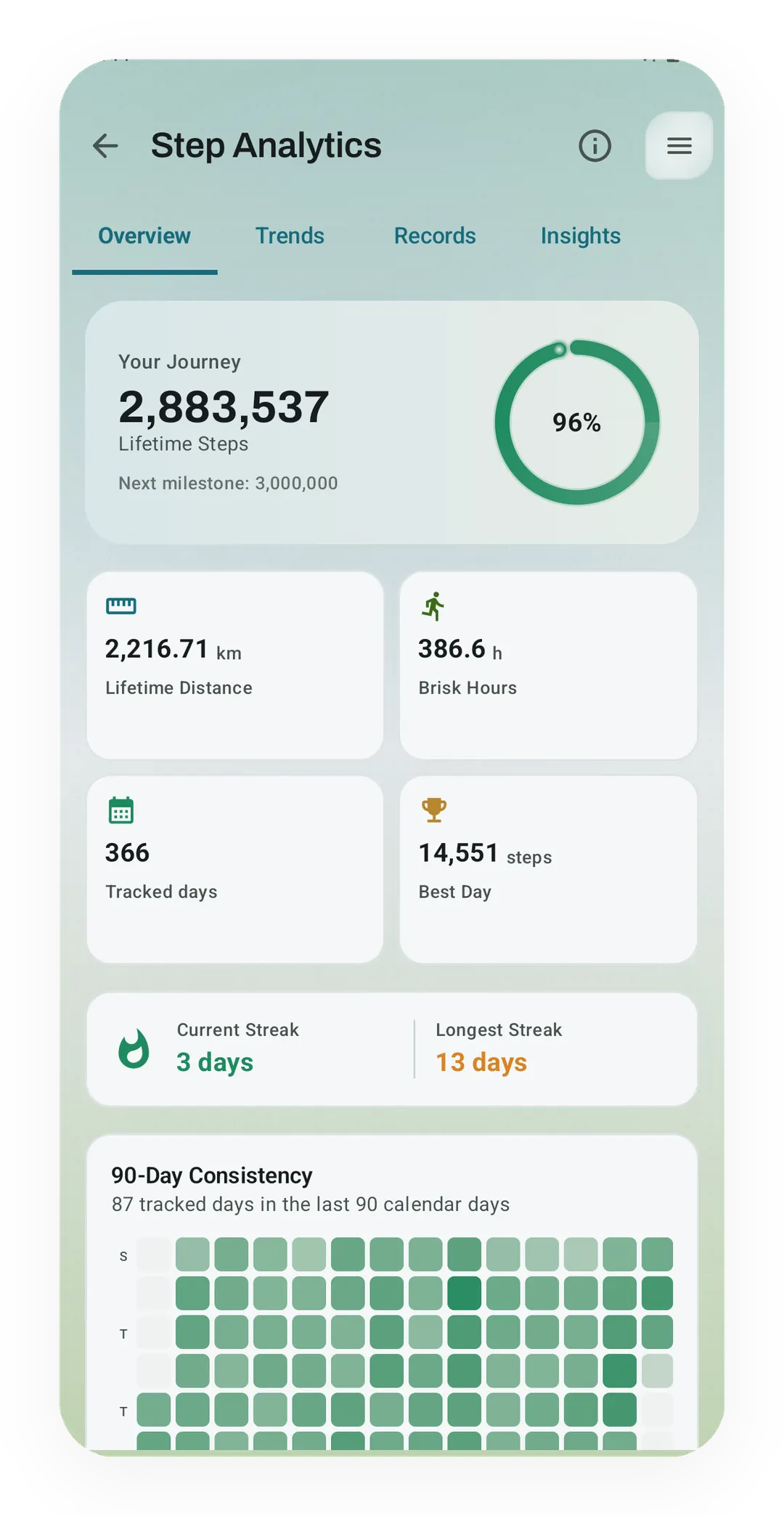
Real app capture, free tier, sample data. The Overview tab of Kinoku's Step Analytics shows lifetime steps and distance, brisk hours, a best day, streaks and a 90-day grid, all counted with no watch. The Trends and Insights tabs next to it are Pro.
One of the apps on this page
Kinoku is free to install
Core tracking works offline, with no account. An export from the app you use today can come along.
Android only for now, with an iPhone version in the works. Some depth is paid, and the pricing page says which parts.
Related features
Daily steps, streaks, brisk minutes, and an hour-by-hour view of how you moved.
Live pace, splits, a route map, and audio cues. Your run record is not uploaded to Kinoku; map tiles load when you view maps, and weather is a clear opt-in.
Every set, one tap. Track how hard each set felt, your rest timers, set types, and notes.
Kinoku reads and writes Android Health Connect data without passing it to a cloud. Period flow import is a Pro feature and read-only. Kinoku never writes cycle data back to Health Connect.