

Is there an app that plans deload weeks for me? (2026)
Nine workout apps compared on who plans the deload week for you, which ones do it on a free plan, and what each one changes in that lighter week.
Yes: Kinoku and Liftosaur plan deload weeks on a free plan with no account, Boostcamp and STRNTH ship free programs with deloads built in, and Alpha Progression, JEFIT and RP Hypertrophy keep the deload the app times for you on a paid plan.
At a glance
| App | Best for | Better at | Main trade-off |
|---|---|---|---|
| Kinoku | Android lifters who want the app to plan their deload weeks for free, with the 5/3/1 deload weights set for them and no account | A free 5/3/1 deload week at 40, 50 and 60% of the training max, repeated for up to 52 weeks | Android only; outside 5/3/1 it marks the deload week but you pick the lighter weights, and the feedback-based cuts are Pro |
| Liftosaur | Lifters who want to write their own deload rule into the program, free and with no account | Deloads written into an editable program script, free | You write or edit the rule yourself in its script language |
| Boostcamp | Lifters who want coach-written programs that already include deloads | 130+ coach-designed plans with periodization and deloads in a free library | An account to start, and Auto Progression is in Pro |
| STRNTH | iPhone lifters who want free programs with planned deloads | 16 programs with multi-week blocks and deloads, on its free plan | iPhone, iPad and Apple Watch only |
| Alpha Progression | Lifters who want deloads inside a plan the app generates, and will pay for Pro | Cycles and deloads in a generated plan, with a weight and rep target for each set | Its plan table puts deloads in the Pro column |
| JEFIT | Lifters who want the app to time each deload from weekly signals, and will pay for Elite | A four-phase cycle that ends in a deload and can bring an early deload | Its pages put the phase cycle in JEFIT Elite |
| RP Hypertrophy | Lifters training for muscle size who want the last week of every block made a deload | Every block ends in a deload, and it can back off early from your feedback | A paid membership, used in a web browser on Android for now |
| Gravl | Lifters who want each workout built around which muscles are still recovering | Plans the week around recovering muscles and the equipment you own | Its pages name no deload week, and full plans are Premium |
| Wendler Log 531 | 5/3/1 lifters who want to set how long a cycle runs, deload weeks included | Cycle length from 3 to 10 weeks, deload weeks included | Its listing does not say which features are free |
Publisher disclosure
Kinoku, made by Dreamsoft Works, writes and publishes this page, and Kinoku is one of the apps on it. Every fact about another app comes from a page that app's maker publishes, opened on October 21, 2026. We give no score. The caption names the measure that orders the list, and every label points at a quoted sentence.
Quickstart
Yes. Kinoku and Liftosaur plan deload weeks for free with no account, and Boostcamp and STRNTH (a strength app for iPhone) ship free programs with deloads built in. Alpha Progression, JEFIT (a workout planner) and RP Hypertrophy, from Renaissance Periodization, time deloads on a paid plan. We give no score, and the order follows where each app’s pages put deload planning.
Which apps plan your deload weeks?
A deload week is a planned lighter week, with less weight, fewer sets or both, so your body can recover before the next block of hard training. Most lifters know they need one, and the hard part is remembering when it is due and how light to go. An app can take over either part.
The nine apps here split into four groups by what their own pages say about where that planning sits.
- Free, with no account: Kinoku and Liftosaur. Kinoku’s 5/3/1 template sets the deload weights itself. Liftosaur’s Play listing says its program scripts let you set “progression rules, and deloads”, and its premium page lists programs and the editor under “Everything else is free”.
- Free, with an account or no account rule stated: Boostcamp and STRNTH. Boostcamp offers “130+ coach-designed plans with progressions, periodization, and deloads” in a free library, after you create an account. STRNTH lists “16 progressive programmes with planned deloads” on its free plan, for iPhone.
- On a paid plan: Alpha Progression, JEFIT and RP Hypertrophy. These three time the deload for you, and each one sells it as part of a paid tier or membership.
- The pages do not say: Gravl and Wendler Log 531. Gravl’s pages describe workouts built around recovering muscles and name no deload week. Wendler Log 531 lets you set cycle length “including deload weeks” but does not say whether that part is free.
Side by side
Each cell below rests on the app’s own store listing, site or help center, and Kinoku’s row rests on its program code. A cell that reads “Not stated” is one that no page from that app covers.
| App | Who places the deload | What changes that week | Reacts to how you feel | Free plan | Android |
|---|---|---|---|---|---|
| Kinoku | The template | 5/3/1: 40, 50, 60% of the training max | Pro, from effort ratings, sleep and heart rate | Yes | Yes |
| Liftosaur | Your program script | What the script says | Your script’s rules | Yes (“Everything else is free”) | Yes |
| Boostcamp | The coach’s program | Not stated | Auto Progression in Pro | Yes (“The library is free”) | Yes |
| STRNTH | The built-in program | Not stated | Not stated | Yes (“Free forever”) | No |
| Alpha Progression | Its plan generator | Not stated | Pro targets from your logged sets | Logging and your own plans | Yes |
| JEFIT | Its phase cycle | “Lighter weights and easier sets” | Can trigger an early deload | Not for the phase cycle | Yes |
| RP Hypertrophy | The last week of each block | Lower volume | Backs off from your feedback | No free plan shown | Browser |
| Gravl | Not stated | Not stated | Tracks recovering muscles | “Free to start” | Yes |
| Wendler Log 531 | You set the cycle length | Not stated | Not stated | Not stated | Yes |
Each app, in its own words
Kinoku
Best for: Android lifters who want the app to plan their deload weeks for free, with the 5/3/1 deload weights set for them and no account.
Kinoku is a free Android training app with 25 program templates, and it keeps your training on the phone with no Kinoku server in between, although Android’s own backup may copy some app data. Fourteen of the templates put a deload week into their phase plan, and every template, the program builder and the named programs are free.
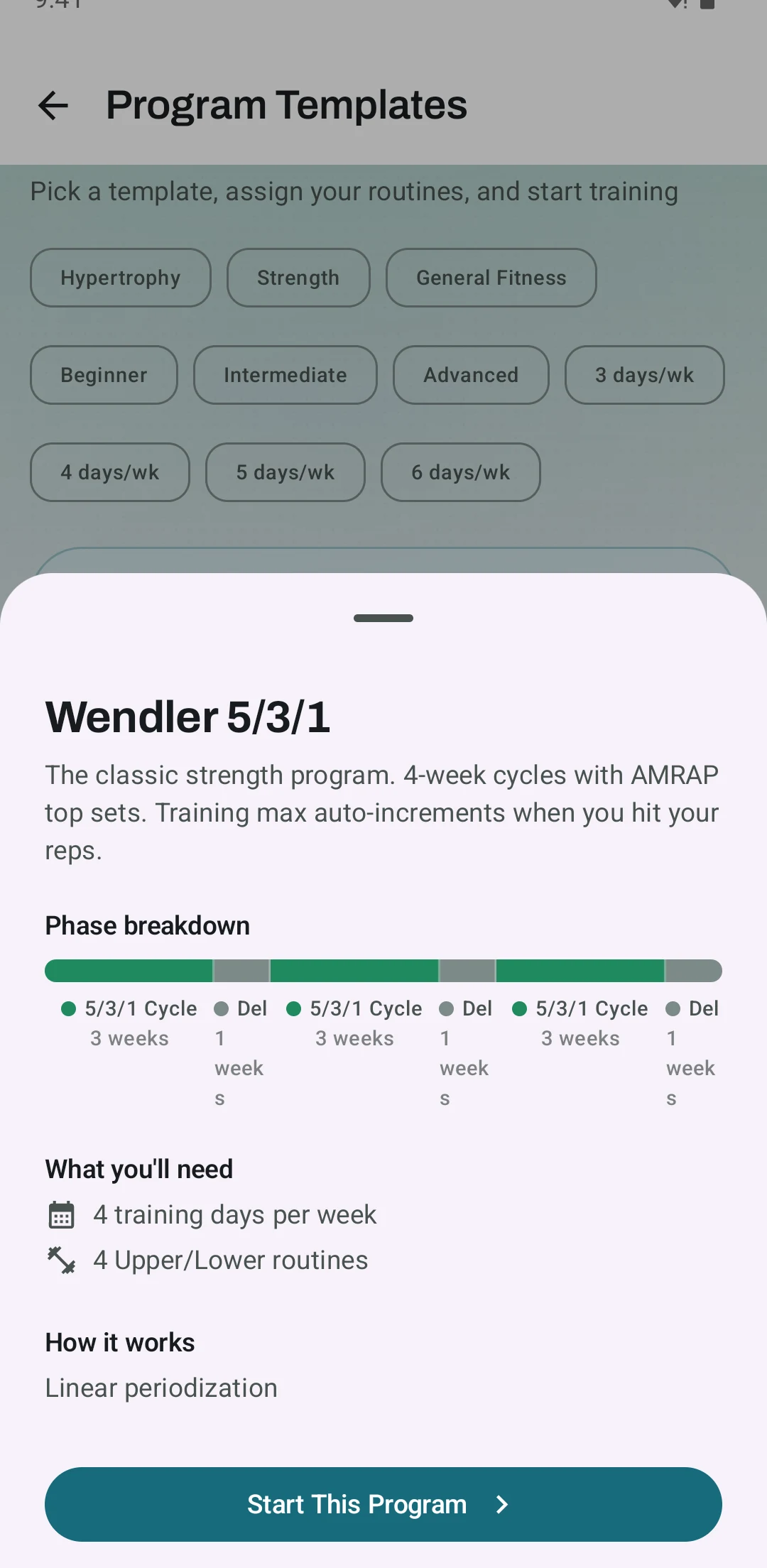
- What it does well: On its template for Jim Wendler’s 5/3/1, Kinoku plans every fourth week as a deload and writes the sets for you. Each lift gets five reps at 40, 50 and 60 percent of its training max (TM), a number set below your one-rep max. The template runs for 12, 24 or 52 weeks, with a deload after each three-week wave.
- What it does about stalls: GZCLP (coach Cody Lefever’s starter barbell program), nSuns (a 5/3/1 offshoot from the r/nSuns forum) and the linear programs have no deload week, so Kinoku lowers a lift’s weight after missed sessions instead.
- What Pro adds: autoregulation trims a lift for the next session when your sets felt harder than planned, and readiness tuning can lighten today’s session on a night of poor sleep or a low heart rate reading.
- What Kinoku does not do: It has no iPhone version yet, and your record stays on one Android phone. Outside 5/3/1 it marks the deload week but leaves the weights to you, and the builder has no setting for how often a deload comes.
Liftosaur
Best for: Lifters who want to write their own deload rule into the program, free and with no account.
Liftosaur is a workout planner where each program is a short script you can change. Its Play listing says the app moves your weights and reps up or down by rules you write yourself.
- What it does well: The script covers every detail, and the listing names “progression rules, and deloads” among them. Its 5/3/1 Boring But Big program raises your max “After completing each 3-week working cycle (before the deload)”.
- What its pages say about limits: The deload is only as smart as the rule in the script, so a change to it means editing that script.
- Where it is the better pick: A lifter who wants the deload to follow a rule they wrote, such as a lighter week after a set number of hard weeks.
- Where Liftosaur differs: Its sync and offline page says the app works with no account and with no signal. Official listing: Google Play.
Boostcamp
Best for: Lifters who want coach-written programs that already include deloads.
Boostcamp is a program library and gym logger. Its Play listing offers “130+ coach-designed plans with progressions, periodization, and deloads, plus a huge community library.”
- What it does well: The deload comes with the program, so a lifter who picks a coach’s plan gets that coach’s deload weeks without planning them. The listing says “The library is free. No ads.”
- What its pages say about limits: Its tracker page says to “create a free account” after you install the app. Weight targets that adjust to your results sit behind “Auto Progression (PRO)”.
- Where it is the better pick: A lifter who trusts a named coach’s program and wants the deloads exactly where that coach put them.
- Where Boostcamp differs: Its pages do not say how much lighter a deload week is, because that changes from one program to the next. Official listing: Google Play. Versus page: Kinoku vs Boostcamp.
STRNTH
Best for: iPhone lifters who want free programs with planned deloads.
STRNTH is a strength app for iPhone, and its App Store listing promises “16 progressive programmes with planned deloads.”
- What it does well: Under the heading “Free forever”, the listing includes “Built-in programs with multi-week blocks and deloads baked in”. A recent update says “Every built-in workout and programme is now free to use.”
- What its pages say about limits: The listing names “iPhone, iPad, Apple Watch” and no Android version.
- Where it is the better pick: A lifter on an iPhone who wants a ready block with its deload set, at no cost.
- Where STRNTH differs: Its listing does not say where the deload falls in a block or whether you can move it. Official listing: App Store.
Alpha Progression
Best for: Lifters who want deloads inside a plan the app generates, and will pay for Pro.
Alpha Progression builds a training plan and suggests a weight and rep count for each set. Its Play listing says “Structure your weight training in cycles and deloads, or create a progressive plan where sets and effort (RIR) increase week by week,” where RIR means reps in reserve, the reps you could still have done.
- What it does well: Deloads come inside a plan built after you “Pick your goals, equipment, training frequency, and duration”, next to per-set weight and rep advice.
- What its pages say about limits: The plan table on its homepage lists “RIR, periodization, deloads” in the Pro column. The free version lets you “Track unlimited workouts and build your own plans for free.”
- Where it is the better pick: A lifter who wants a generated hypertrophy plan with the deloads already placed, and who will pay for that.
- Where Alpha Progression differs: Its free plan logs workouts and keeps your own plans, while the deload planning is Pro. Official listing: Google Play. Versus page: Kinoku vs Alpha Progression.
JEFIT
Best for: Lifters who want the app to time each deload from weekly signals, and will pay for Elite.
JEFIT is a workout planner and logger, and its Adaptive Mesocycle Training runs “Three complete training cycles, each with four distinct phases (On-Ramp, Accumulation, Intensification, Deload).”
- What it does well: It reviews each week and can move you on, hold you, or “trigger an early deload to prevent burnout.” On a plan you built yourself, “Jefit handles when to push and when to ease off, phase by phase, while your exercises stay exactly as you set them.” Its deload phase means “Lighter weights and easier sets, on purpose”.
- What its pages say about limits: “Adaptive Mesocycle Training is available now in JEFIT Elite,” and periodization on your own plan is “included with Jefit Elite”.
- Where it is the better pick: A lifter who wants the app to decide when to deload from how the weeks went, not on a fixed date.
- Where JEFIT differs: The deload timing reacts to your training, while a fixed program like 5/3/1 puts it in the same week every cycle. Official listing: Google Play. Versus page: Kinoku vs JEFIT.
RP Hypertrophy
Best for: Lifters training for muscle size who want the last week of every block made a deload.
RP Hypertrophy is Renaissance Periodization’s training app for muscle growth. Its help center says “Yes, the last week of the block is always a deload.”
- What it does well: The app “adjusts to your pump, soreness, and workload feedback to create the perfect training plan week-by-week.” When volume drops before the last week, its help center says the algorithm likely decided “(based on your feedback) that you would benefit from backing off a bit”.
- What its pages say about limits: A block is “capped at 8 weeks, which includes the deload as week 8”. The app page sells an annual and a monthly membership and shows no free plan.
- Where it is the better pick: A lifter running hypertrophy blocks who wants each block to end lighter, with the length up to them.
- Where RP Hypertrophy differs: On Android it is “a web based application, which means it is accessed via a browser on your device,” and its page says the app “will be in the US Google Play Store shortly”. Official page: RP Hypertrophy app.
Gravl
Best for: Lifters who want each workout built around which muscles are still recovering.
Gravl builds strength workouts with AI (artificial intelligence). Its homepage says “Gravl tracks your recovery, plans your week, and adapts every workout to the gym you are in.”
- What it does well: Its Play listing says Gravl “accounts for the equipment you own, which muscles are still recovering, what you trained last session, and which lifts you’ve neglected.”
- What its pages say about limits: “Free to start. Full training plans, the Wear OS app and analytics on Gravl Premium.” The pages we opened name no deload week, and one App Store release note reads “Added deload info to the Weight Insights tab.”
- Where it is the better pick: A lifter who wants each session fitted to recovering muscles and the gym they are in that day, more than a block with a set deload.
- Where Gravl differs: It plans session by session, so the pages do not describe a lighter week at a fixed point. Official listing: Google Play.
Wendler Log 531
Best for: 5/3/1 lifters who want to set how long a cycle runs, deload weeks included.
Wendler Log 531 is a 5/3/1 app, and its listing says it “instantly generates your complete strength program and training cycle with precise weights for every set.”
- What it does well: You can “Configure cycle length from 3 to 10 weeks including deload weeks”, which suits variations that run two leader cycles before a deload.
- What its pages say about limits: The listing has a “POWERFUL PRO FEATURES” heading and puts cycle length under a different heading, but it does not say which parts are free.
- Where it is the better pick: A 5/3/1 lifter who wants a longer or shorter cycle than the standard four weeks.
- Where Wendler Log 531 differs: It is built for one program, while the other apps here run many. Official listing: Google Play.
How Kinoku plans a deload
Kinoku plans a deload in three ways, and only the first one sets the weights for you on the free plan.
- A deload week in the program. Wendler’s 5/3/1 runs three wave weeks and then a deload week. Kinoku writes that week as three sets of five at 40, 50 and 60 percent of the training max, with no all-out last set, and it leaves the training max alone. The other templates with a deload phase mark that week on the program’s phase bar, and you choose how light to go.
- A lower weight after a stall. GZCLP, nSuns and the linear programs have no deload week. GZCLP drops the training max to 90 percent after a failed 10 sets of 1, and nSuns does the same after two short sessions in a row.
- A suggestion from the Coach screen. On the free plan, Today’s Focus suggests a deload when your weekly volume has risen three weeks in a row at a hard effort. That means your recent sets average 8 or more out of 10 on the rating of perceived exertion (RPE) scale. It stays quiet during a deload your program already planned.
Pro adds two layers that react to you. After a program session, autoregulation reads each lift’s effort ratings, and when the sets ran harder than planned it lowers that lift by 5 percent next time, sometimes with one set fewer. Readiness tuning reads last night’s sleep and your heart rate variability (HRV), a measure of the gap between heartbeats, from Health Connect. On a bad reading it can lighten your next planned session that day by 10 or 15 percent, and you can choose to train as planned instead.
The full 5/3/1 layout, with its waves and the training max rules, is on the 5/3/1 Boring But Big program page.
How this list was checked
Each fact about another app is a quote from a page its maker publishes, and every one of those pages was opened on October 21, 2026, the day this page went up.
- Other apps: the table cells and the labels quote the app’s store listing, homepage, blog or help center. RP Strength’s help pages refuse automated reads, so we read those articles through the help center’s public article feed on the same day. We ran no device test of these apps.
- The app list: we started from the apps that ChatGPT and Google’s AI Overview named for this question in October 2026, and kept the ones whose own pages say something about deloads or recovery. We added Liftosaur and Wendler Log 531 because their pages describe deload weeks in a program.
- Kinoku: Kinoku’s facts come from the app’s program code, including the 5/3/1 deload sets, the template phase plans, the stall rules, the Coach rule and the two Pro layers.
- Order: the apps are grouped by where their own pages put deload planning, and listed from A to Z inside a group. No app paid for its place. The page prints no price, because no page we opened gives one figure for every plan.
Frequently asked questions
Which apps put a deload week in the plan for free?
Kinoku and Liftosaur do it on a free plan with no account. Kinoku’s 5/3/1 template sets every fourth week as a deload with the weights worked out, and Liftosaur’s free programs write the deload into a script you can edit. Boostcamp’s free library has coach plans with deloads after you make an account, and STRNTH lists programs with deloads on its free plan for iPhone.
Which apps decide when to deload from how my training is going?
JEFIT Elite says it can trigger an early deload from weekly signals. RP Hypertrophy ends every block with a deload and says it may cut volume early from your feedback. Kinoku’s free Coach screen can suggest a deload after three weeks of rising volume at a hard effort, and Kinoku Pro trims a lift for the next session when your sets felt harder than planned.
How does Kinoku plan the 5/3/1 deload week?
After three wave weeks, the fourth week of each cycle is the deload. Kinoku sets three sets of five at 40, 50 and 60 percent of each lift’s training max and drops the last all-out set. The training max does not change that week. The template runs for 12 weeks by default, or for 24 or 52 weeks with a deload after every wave.
Does Kinoku lighten the deload week on its other templates?
No. Fourteen of Kinoku’s 25 program templates put a deload week in their phase plan, but only 5/3/1 writes lighter weights into that week. On the others, the program shows the deload phase and leaves your sets and weights as they are, so how much to back off is your call.
What does Kinoku do when a lift stalls on GZCLP, nSuns or a linear program?
Those programs have no planned deload week, so Kinoku lowers the weight after misses instead. GZCLP drops the training max to 90 percent after a failed 10 sets of 1. nSuns drops it to 90 percent after two short sessions in a row. The linear programs take 10 percent off a lift after a set number of missed sessions.
Can Kinoku suggest a deload if I am not on a program?
Yes, on the free Coach screen. When your weekly volume has risen three weeks in a row and your last two weeks of logged sets average an effort of 8 or more out of 10, Today’s Focus suggests that a planned deload could help. It stays quiet during a deload phase your program already planned, and it needs effort ratings on your sets.
What does Kinoku Pro add for deloads?
Two layers that lighten work for you. Autoregulation reads how hard your sets felt and, when they ran harder than planned, cuts that lift by 5 percent next time, sometimes with one set fewer. Readiness tuning reads sleep and heart rate variability from Health Connect and can lighten your next planned session that day by 10 or 15 percent, unless you choose to train as planned.
How often does a deload week come in these apps?
It depends on the plan. In Kinoku’s templates a deload comes after three to eight weeks of work, and 5/3/1 puts one in every fourth week. RP Hypertrophy caps a block at 8 weeks with the deload as the last week. Wendler Log 531 lets you set a cycle from 3 to 10 weeks, deload weeks included.
Do I need an account to get deloads planned?
Not in Kinoku, which has no account at all, and not in Liftosaur, whose page says you can use it without one. Boostcamp’s tracker page tells you to create a free account. RP Hypertrophy has you sign in to its web app. The pages we opened for Alpha Progression, JEFIT, STRNTH, Gravl and Wendler Log 531 do not settle it.
Which of these apps run on Android?
Kinoku, Liftosaur, Boostcamp, Alpha Progression, JEFIT, Gravl and Wendler Log 531 all have Google Play listings. RP Hypertrophy runs in a phone browser, and its page says a Google Play version is coming. STRNTH lists iPhone, iPad and Apple Watch only.
What does Kinoku not do for deloads?
Kinoku has no iPhone app and no sync between two phones. Outside 5/3/1 it does not lower your weights in a planned deload week, and the builder has no setting for how often a deload comes. The parts that react to how your sets felt, your sleep or your heart rate sit in Pro.
Related pages
- Best workout program apps for periodization: Program runners and plain loggers side by side, with how each handles cycles.
- Best 5/3/1 apps for Android: How seven apps set and raise the 5/3/1 training max, deload week included.
- Free workout trackers with RPE and RIR: Which apps log effort per set, the input that feedback-based deloads read.
- Which free app runs GZCLP or nSuns on Android?: How five apps move the weights after a stall.
- RPE vs RIR: The two effort scales and how an app turns them into weight changes.
- 5/3/1 Boring But Big program page: The waves, the deload week and the setup steps in Kinoku.
- Periodization: The program builder, the 25 templates and the Pro layers that adjust a plan.
Which one fits you
- Choose Kinoku if you want an Android app that plans your deload weeks for free, sets the 5/3/1 deload weights for you, and needs no account.
- Choose Liftosaur if you want to write the deload rule yourself and keep programs free with no account.
- Choose Boostcamp if you want a coach's program that already has its deloads written in, and an account is fine.
- Choose STRNTH if you train on an iPhone and want free programs with the deloads set out.
- Choose Alpha Progression if you want a generated plan with cycles and deloads, and will pay for Pro.
- Choose JEFIT if you want the app to move you through phases and call an early deload, and will pay for Elite.
- Choose RP Hypertrophy if you train for muscle size, want every block to end in a deload, and will pay for a membership.
- Choose Gravl if you want each session built around recovering muscles more than a set deload week.
- Choose Wendler Log 531 if you run 5/3/1 and want to choose a cycle length from 3 to 10 weeks.
How this page is checked. Every fact about another app on this page comes from a page that app publishes, which we could open and quote on October 21, 2026. The sources, with the exact sentence each fact rests on, are listed just above. Every Kinoku fact is tied to the shipping app's code. The page carries no score; the caption above names the measure the list is ordered by. If a fact here has gone stale, the support page is the fastest way to tell us.
Kinoku in practice
Where this shows up in the app
 Open full-size image ↗
The Wendler 5/3/1 template in Kinoku
Real Android app capture, free tier. The template sheet shows the phase bar of three-week waves and deload weeks before you start the program.
One of the apps on this page
Kinoku is free to install
Core tracking works offline, with no account. An export from the app you use today can come along.
Android only for now, with an iPhone version in the works. Some depth is paid, and the pricing page says which parts.
Related features
A 4-phase planning stack. The builder, all 25 templates, named programs with auto-progression, the custom model, and unlimited active programs are free. Pro adds volume targets, readiness tuning, and auto set changes.
Coaching screens that run on your phone and explain what changed in your training and why it matters.
Unlimited routines, Smart Sync, Starter Packs, and follow-along links are free, and so are Rotation Groups that cycle through several routines for you.