

Best Alpha Progression alternatives (2026)
Five apps to replace Alpha Progression, ordered by watch support as each app's pages state it, with offline use, free plans and program engines compared.
Hevy, Kinoku, KeyLifts and Strong each state a watch app on their own pages, which Alpha Progression says it lacks; Kinoku is the only one of the four whose pages say it needs no account and a program engine that runs offline.
At a glance
| App | Best for | Better than Alpha Progression at | Main trade-off |
|---|---|---|---|
| Hevy | Lifters who want Apple Watch or Wear OS logging with a friends feed | Apple Watch and Wear OS apps, a desktop view, and a social feed | An account first, four free routines, and no program engine on its pages |
| Kinoku | Android lifters who want a Wear OS app and a program engine that works offline | A free Wear OS app, named programs computed on the phone, and no account | Android only for now, no generated plan, and readiness tuning sits in Pro |
| KeyLifts | Lifters on percentage-based programs who want an Apple Watch app | An Apple Watch app, and over 170 templates with training weights prepared | Built for percentage programs; its pages state no price and no account policy |
| Strong | iPhone lifters who want an Apple Watch app and a quiet set table | An Apple Watch app, cloud sync between devices, and no ads | An account first, three free templates, charts under PRO, and no program engine |
| Boostcamp | Lifters who want a coach-written program from a free library instead of a generated one | A free library of 11,000+ programs with progressions, periodization and deloads | An account to start, no watch app on its pages, and Strength Score in Pro |
Publisher disclosure
Kinoku, made by Dreamsoft Works, writes and publishes this page, and Kinoku is one of the apps on it. Every fact about another app is quoted from a page that app publishes, opened on September 20, 2026, or observed in our own emulator tests. We give no score. Where the list is ordered, the caption names the measure, and every label points at a quoted sentence.
Quickstart
Hevy, Kinoku, KeyLifts and Strong each state a watch app on their own pages, which Alpha Progression’s blog says it lacks. Kinoku is the only one of the four whose pages say it needs no account and a program engine that runs offline. The list is ordered by watch support as each app’s pages state it, apps with a watch app first and alphabetical inside the group, with Boostcamp last because its pages name none. Behind every label sits a quoted sentence or a dated emulator test, and we give no score.
Why lifters look for an Alpha Progression alternative
Alpha Progression’s free version is generous by its own account: “unlimited workout logging, manually created plans, all 795 built-in exercises and their demonstration videos, and no ads.” Its own pages also name three things that send lifters looking.
- No watch app: “There is currently no dedicated Apple Watch or Wear OS app.” A lifter who logs from the wrist has to carry the phone.
- The engine is Pro, and part of it needs a connection: The homepage lists “Progression recommendations” under Pro, and the blog says “Generating a plan or standalone workout requires an internet connection.” Pro costs $12.99 a month or $79.99 a year at standard US pricing, after a 14-day free trial.
- A generated plan is the product: “The algorithm hands you a precise weight, rep count, and intensity target for every set.” A lifter who runs a named program by its own rules may not want an algorithm in between.
Each of the five apps below answers at least one of those.
Which Alpha Progression alternatives have a watch app?
This is the measure the list is ordered by, taken from what each app’s pages state.
- Apple Watch and Wear OS: Hevy’s homepage names both, for tracking a workout with the phone left in the locker.
- Wear OS: Kinoku’s free Wear OS app logs sets, records runs and counts steps, and syncs to the phone on its own.
- Apple Watch: KeyLifts’ homepage says it is available for “iPhone, iPad, Apple Watch, and Android”. Strong’s help centre names iPhone with Apple Watch and Android, and does not mention Wear OS.
- Not stated: Boostcamp’s homepage and listing do not mention a watch.
Side by side
What a cell says, the app said first, or we saw it on the emulator on a stated date; “Not stated” means its pages are silent.
| App | Watch app | Offline | Free plan, in its words | Program engine | Account required |
|---|---|---|---|---|---|
| Hevy | Apple Watch and Wear OS | Saved a workout offline, uploaded later, in our test | 4 routines in our test | Not stated | Yes, in our test |
| Kinoku | Wear OS | Yes, the log and the program engine | No cap on routines, programs or history | Yes, named programs on the phone | No account |
| KeyLifts | Apple Watch | Not stated | Free to download; subscription options in the stores | Yes (“training weights and progression prepared”) | Not stated |
| Strong | Apple Watch; Wear OS not mentioned | Saved a set offline in our test | 3 templates | Not stated | Yes (“prompted to sign up”) |
| Boostcamp | Not stated | “Offline.” | “The library is free. No ads.” | Coach plans with progressions built in | Yes (“create an account”) |
Each app, in its own words
Hevy
Best for: Lifters who want Apple Watch or Wear OS logging with a friends feed.
Hevy is a social workout tracker, and it is the one app here whose pages name both watch platforms.
- What it does well: A free workout tracker for iOS and Android, in its homepage’s words, that lets you “Leave your phone in the locker room” and log from an Apple Watch or a Wear OS watch, with a desktop view on top. Hevy sells itself on routines and progress shared with friends.
- What its pages say about limits: The fifth routine in Hevy 3.1.12 opened a sheet reading “Free accounts have a limit of 4 routines”, and sign-up or log-in came before the first set with no skip path. With the network off, a saved workout showed “1 workout failed to upload” until the connection returned. Its pages describe no program engine.
- Where it is the better pick: An Alpha Progression user who wants the watch app most, on either platform, and a feed to share workouts on.
- Where Hevy differs: You bring your own numbers, and an account comes first. Official listing: Google Play. Versus page: Kinoku vs Hevy.
Kinoku
Best for: Android lifters who want a Wear OS app and a program engine that works offline.
Kinoku is a private training app for Android with a free Wear OS app and a program engine that never needs a connection.
- What it does well: The Wear OS app logs sets, records runs and counts steps on the wrist. The program builder, the templates and named programs such as 5/3/1, GZCLP (a beginner barbell program) and nSuns run with the progression computed on the phone, with no cap on active programs. The library holds more than 1,300 exercises with muscle data, custom exercises have no cap, and nothing needs an account.
- What its pages say about limits: What is free today stays free, by the public promise page; Pro adds volume targets, readiness tuning and auto set changes on top of a logging layer that has no cap.
- Where it is the better pick: An Alpha Progression user on Android who wants a watch, a named program computed offline and no account.
- What Kinoku does not do: Kinoku does not generate a plan from your goals or recommend a weight for every set the way Alpha Progression’s algorithm does. Its library comes with no form videos, and it has no social feed and no iPhone app yet.
KeyLifts
Best for: Lifters on percentage-based programs who want an Apple Watch app.
- What it does well: “KeyLifts is available for iPhone, iPad, Apple Watch, and Android.” Its homepage says it lets you “Build, run, and track percentage-based programs such as 5/3/1 with training weights and progression prepared for every session”, and you can browse 5/3/1, GZCL (the program family GZCLP belongs to), nSuns, Tactical Barbell and Starting Strength among over 170 verified templates.
- What its pages say about limits: “It is free to download; the App Store and Google Play show the current subscription and in-app purchase options”. The page prints no price and states no account policy or offline behaviour.
- Where it is the better pick: An Alpha Progression user who runs a named percentage program and wants the numbers prepared, with an Apple Watch on the wrist.
- Where KeyLifts differs: Its pages describe no generated plan, no run log and no muscle map, and Wear OS is not on its platform list. Official listing: Google Play.
Strong
Best for: iPhone lifters who want an Apple Watch app and a quiet set table.
Strong is an early phone gym log with an Apple Watch app and no social feed.
- What it does well: Apps for iPhone with Apple Watch, and for Android, per the help centre. Strong Cloud keeps workouts synced between devices, there are “no ads, ever”, and workout data exports to a spreadsheet-friendly CSV. In our test, Strong 6.2.4 saved a set with flight mode on and kept it after a forced stop.
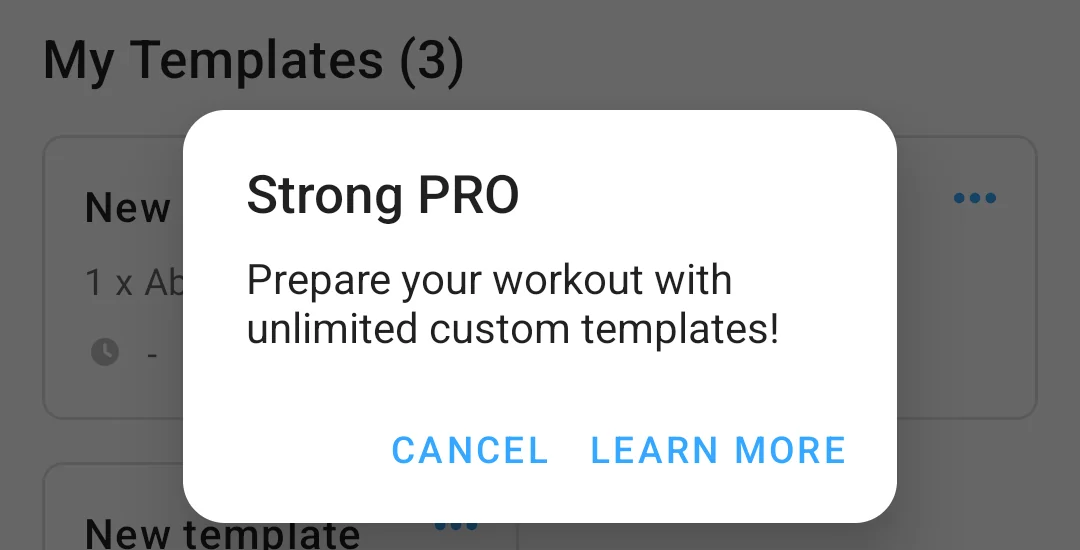
- What its pages say about limits: The help centre caps the free version at three workout templates, with unlimited in Strong PRO; the Learn More screen in our test read “Current free limit: 3 templates”. “Access to all Charts” is a PRO feature, all users are prompted to sign up before use, and its pages describe no program engine.
- Where it is the better pick: An Alpha Progression user on an iPhone who plans their own cycles and wants an Apple Watch app with a plain log.
- Where Strong differs: No program engine and no Wear OS on its pages, and three free templates. Official listing: Google Play. Versus page: Kinoku vs Strong.
Boostcamp
Best for: Lifters who want a coach-written program from a free library instead of a generated one.
Boostcamp replaces the algorithm with a library: programs written by coaches, followed set by set.
- What it does well: The homepage describes a free tracker with 11,000+ programs from coaches including Eric Helms and Cody Lefever. The listing describes “130+ coach-designed plans with progressions, periodization, and deloads” and says “The library is free. No ads.” It also carries a one-word Offline bullet under its tracker.
- What its pages say about limits: Strength Score, the per-muscle heatmap and the 20+ exclusive coach programs sit in Pro, per its Pro page, and the homepage says to “create an account” first. Its pages do not mention a watch app.
- Where it is the better pick: An Alpha Progression user who would rather follow a named coach’s plan than a generated one, and does not need a watch.
- Where Boostcamp differs: No watch app on its pages and an account before the first program, which is why it sits last on a list ordered by watch support. Official listing: Google Play.
When is Alpha Progression still the better pick?
You do not always need to leave, and Alpha Progression’s own pages make the case in three situations.
- You want the plan generated for you: “The algorithm hands you a precise weight, rep count, and intensity target for every set.” No app on this page does that from your goals and equipment.
- You want form video on every exercise: “795 exercises. Real form videos.” Kinoku’s library has muscle data and no filmed video, so you would find your own on YouTube and save it to the exercise.
- You want the free log with no ads and no cap: The blog’s free version sentence covers unlimited logging and manual plans, and if you never need the generator, there is nothing to pay for.
If a watch app is the reason you are here, the four apps at the top of the list each name one, and Kinoku’s comes with no account.
How this list was checked
Every fact about another app is a sentence from its homepage, blog, help centre or store listing, opened on September 20, 2026, or a dated emulator observation.
- Public citations: Each competitor claim is cited by number in the sources aside, with the exact sentence.
- Phone observations: The Strong template cap and offline set, and the Hevy routine cap, sign-up wall and offline upload notice, were recorded on an Android 16 emulator on the dates in their source notes. Alpha Progression, KeyLifts and Boostcamp were not put through an emulator test.
- Watch support sets the order: Nothing else does, and no app paid to appear; ties stay alphabetical.
Frequently asked questions
The questions Alpha Progression users ask before switching, answered from the apps’ own pages.
Does Alpha Progression have a watch app?
No. Its own blog says there is currently no dedicated Apple Watch or Wear OS app, which is why this page is ordered by watch support. Hevy’s homepage names both Apple Watch and Wear OS, Strong’s help centre and KeyLifts’ homepage each name Apple Watch, and Kinoku has a free Wear OS app. Boostcamp’s pages do not mention a watch either, so it sits last.
Is Alpha Progression free?
Partly. Its blog says the permanent free version has unlimited workout logging, manually created plans, all 795 exercises with videos, and no ads. The plan generator and the per-set progression recommendations are Pro, which the same blog prices at $12.99 a month or $79.99 a year at standard US pricing, after a 14-day free trial named on the subscribe page.
Which Alpha Progression alternatives work offline?
Alpha Progression’s blog says most training features work offline but generating a plan needs an internet connection. Kinoku’s program engine and log run on the phone with no connection at all. In our tests, Strong 6.2.4 saved a set with the network off, and Hevy 3.1.12 saved a workout and uploaded it once the network returned. Boostcamp’s listing has a one-word Offline bullet, and KeyLifts’ pages do not state offline behaviour.
Which alternatives compute the weights for you the way Alpha Progression does?
KeyLifts and Kinoku. KeyLifts’ homepage prepares training weights and progression for every session of a percentage-based program. Kinoku runs 5/3/1, GZCLP and nSuns as named programs with auto-progression computed on the phone. Neither generates a whole plan from your goals the way Alpha Progression’s algorithm does. Boostcamp offers coach programs with progressions built in, and Hevy’s and Strong’s pages describe no program engine.
Which Alpha Progression alternatives work without an account?
Kinoku alone asks for none. Hevy 3.1.12 showed us a sign-up screen before anything else, with no skip path, Strong’s help centre says users are prompted to sign up before use, and Boostcamp’s homepage says to create an account before choosing a program. KeyLifts’ pages state no account policy. Alpha Progression’s blog mentions an account only for a website purchase.
Can I move my Alpha Progression history to another app?
Alpha Progression’s homepage lists CSV export when you want the raw numbers. Kinoku’s importer reads Hevy, Strong, FitNotes, JEFIT (a lifting app) and Strava files and a minimal CSV with date, exercise, weight and reps columns, so an Alpha Progression CSV in that shape would come in that way. We have not tested an Alpha Progression file, and the other four apps state no import for it on the pages we opened.
Which of these apps has a Wear OS app?
Hevy and Kinoku. Hevy’s homepage says you can leave your phone in the locker room and track your workouts from your Apple Watch or Wear OS device. Kinoku’s free Wear OS app logs sets, records runs and counts steps, and it syncs to the phone on its own. Strong’s help centre and KeyLifts’ homepage name Apple Watch and do not mention Wear OS. Alpha Progression’s blog says it has neither.
Which alternative has the largest exercise library?
Alpha Progression’s homepage says 795 exercises with real form videos. Kinoku ships more than 1,300 exercises with muscle data but no filmed videos, and it puts no cap on custom exercises. You can save your own YouTube form video to any of them. Hevy’s, Strong’s, KeyLifts’ and Boostcamp’s pages we opened do not print a library count, so this page does not compare them on it.
Is Alpha Progression Pro worth paying for instead of switching?
It can be, if the algorithm is what you want. Its homepage says the algorithm hands you a precise weight, rep count and intensity target for every set, and no app on this page generates a plan from your goals in that way. If what you want is a watch on your wrist during the set, its blog says there is no watch app, and the four apps at the top of this list each name one.
Which app is closest to Alpha Progression in feel?
KeyLifts, because both hold a program and hand you the session’s numbers rather than an empty set table. Alpha Progression generates the plan from your goals and equipment, while KeyLifts prepares weights for a percentage-based template you pick. If you came for the log more than the engine, Hevy’s set table on iOS and Android with a watch app is the nearest match.
Which of these apps handles periodization and deloads?
Boostcamp’s listing says its coach-designed plans come with progressions, periodization and deloads. In Kinoku, the deload week and the wave sets of 5/3/1 come from your training max, and the builder handles multi-week phases. KeyLifts’ pages name progression for every session and say nothing about deloads, and neither Hevy’s nor Strong’s pages describe deload logic.
What does Kinoku not do that Alpha Progression does?
Kinoku does not generate a whole plan from your goals, schedule and equipment, and it does not recommend a weight and rep count for every set the way Alpha Progression’s algorithm does; its named programs follow their own progression rules. It ships no form videos of its own and has no iPhone app yet. Readiness tuning, volume targets and auto set changes sit in Pro.
Related pages
- Best Boostcamp alternatives: The same apps sorted by who computes the program weights.
- Best workout program apps for periodization: Program engines and loggers for 5/3/1, GZCLP and nSuns.
- Best Hevy alternatives: Six loggers beside Hevy, sorted by free routine cap.
- Best Strong alternatives: Six loggers beside Strong, sorted by free template cap.
- Wear OS: What Kinoku’s watch app logs without the phone.
- Best 5/3/1 apps for Android: Apps that run Jim Wendler’s percentage waves and raise the training max for you.
- Best Fitbod alternatives: Six apps sorted by whether they build your plan, run a program you pick, or only log.
Which one fits you
- Choose Hevy if you want to log from an Apple Watch or a Wear OS watch and share workouts with friends, and four free routines cover your split.
- Choose Kinoku if you train on Android, you want a Wear OS app and 5/3/1, GZCLP or nSuns computed on the phone with no account and no connection.
- Choose KeyLifts if you run a percentage-based program such as 5/3/1 or GZCL and want an Apple Watch app with the session's weights ready.
- Choose Strong if you train on an iPhone with an Apple Watch, you plan your own cycles, and three free templates are enough.
- Choose Boostcamp if you would rather follow one of 11,000+ coach programs than a generated plan, and an account and no watch app are fine.
Test record
Tested September 11, 2026
- Environment
- Android Studio Pixel phone emulator Kinoku_Phone_Play, API 36, Android 16
- Strong
- Version 6.2.4 (version code 602006), installed from Google Play. Official listing
- Hevy
- Version 3.1.12 (version code 3289233), installed from Google Play. Official listing
- Kinoku
- Version 1.2.0 (version code 30), a test build installed outside Google Play. Official listing
How this page is checked. Every fact about another app on this page comes from a page that app publishes, which we could open and quote on September 20, 2026, or from a dated emulator test named in that source's note. The sources, with the exact sentence each fact rests on, are listed just above. Every Kinoku fact is tied to the shipping app's code. The page carries no score; the caption above names the measure the list is ordered by. If a fact here has gone stale, the support page is the fastest way to tell us.
Test evidence
What the tested builds showed
 Open full-size image ↗
A logger's free cap, in Strong's words
Cropped emulator capture from September 11, 2026. With three templates saved, tapping New template in Strong 6.2.4 opened this dialog. Strong and Hevy bring the watch apps on this page, and this is the kind of cap that comes with them.
One of the apps on this page
Kinoku is free to install
Core tracking works offline, with no account. An export from the app you use today can come along.
Android only for now, with an iPhone version in the works. Some depth is paid, and the pricing page says which parts.
Related features
A real watch app for workouts, runs, steps, tiles, and watch face data.
A 4-phase planning stack. The builder, all 25 templates, named programs with auto-progression, the custom model, and unlimited active programs are free. Pro adds volume targets, readiness tuning, and auto set changes.
Open a lift in Stats and a plain label says if it is progressing, holding steady, or slipping, with a flat-zone band on the chart. The label is free. Pro adds ideas for a stuck lift (options, never orders), an all-lifts dashboard, and a Coach card. It stays quiet when the data is thin.