

Free Muscle Map Workout Trackers for Android (2026)
Which free workout trackers show a muscle map of what you trained? Nine Android apps compared from their own pages: what each map shows and what is free.
Four Android apps say on their own pages that their muscle map is on the free plan: Hevy, Kinoku, SmartWorkout and StrengthLog; Boostcamp puts its heatmap in Pro.
Kinoku's muscle map, in motion
These three clips come from the Android app, and all you see in them is on the free plan.
At a glance
| App | Best for | Better at | Main trade-off |
|---|---|---|---|
| Hevy | Lifters on any phone who want last week's trained muscles on a free body graph | Two free views: the past seven days and each calendar week | The map marks trained muscles in blue rather than shading them by volume |
| Kinoku | Lifters who want to see which muscles they trained this week, by sessions and by volume, free and with no account | It opens on the past seven days for free, in two modes, sessions and volume, and widens to 30 days | The recovery view is Pro, and the app is Android only for now |
| SmartWorkout | Lifters who want a free muscle map after every workout and weekly volume per muscle group | A muscle map after every workout, listed under its free features | Its weekly analytics going back up to 12 weeks are in Pro |
| StrengthLog | Lifters who want a muscle map in a free log, with longer periods for subscribers | Its website lists the muscle map among the free features | Its listing puts any-period muscle heat maps in Premium |
| Boostcamp | Program followers who want a front and back heatmap of volume per muscle | A body heatmap, a radar chart and a table of volume per muscle | The heatmap is part of Pro |
| JEFIT | Lifters who want a muscle map plus a chart of which muscles look recovered | A recovery chart beside the map | No page we could open says which plan holds the map |
| MuscleMap: Workout Tracker | Lifters who want a recovery map that shades muscles from fresh to overreached | Five recovery states on one live map, offline | The free plan keeps six weeks of workout history |
| Strong | Lifters already on Strong who want its muscle heat map | A heat map inside a widely used logger | Its pages name the heat map without a plan or a platform |
| MuscleWiki | People who want to find exercises by tapping a muscle on a body map | A body map built for finding exercises | Its map is an exercise finder, not a record of what you trained |
Publisher disclosure
Kinoku, made by Dreamsoft Works, writes and publishes this page, and Kinoku is one of the apps on it. Every fact about another app is quoted from a page that app's maker publishes, opened on October 4, 2026. We give no score. Where the list is ordered, the caption names the measure, and every label points at a quoted sentence.
Quickstart
Four Android apps say on their own pages that their muscle map is on the free plan: Hevy, Kinoku, SmartWorkout and StrengthLog. The order follows the apps’ own pages, free map first and paid map next, as the table caption says.
Which workout trackers show a free muscle map?
A muscle map is a body figure, front and back, colored by the training you logged. It turns a list of sets into a picture, so a week heavy on chest and light on back shows up at a glance. The apps below draw that picture in different ways, and their own pages say how.
- A map on the free plan, by their own pages. Hevy, Kinoku, SmartWorkout and StrengthLog. StrengthLog keeps its any-period view for subscribers, and Kinoku keeps its recovery view for Pro.
- A map in the paid plan. Boostcamp’s listing says Pro adds its per-muscle volume heatmap.
- A map with no stated plan. JEFIT (a workout tracker and gym log for Android), MuscleMap: Workout Tracker and Strong name a map without saying which plan holds it.
- A map for finding exercises. MuscleWiki’s body map helps you pick an exercise for a muscle, which is a different job from recording what you trained.
The useful question is what each map counts. Some count the days you trained a muscle, some shade by volume, and some guess how rested each muscle is. A map that counts sessions and one that weighs load can tell two different stories about the same week, so the table below names what each map shows.
Side by side
Every cell below comes from the maker’s own page, and “Not stated” means none of its pages we opened says.
| App | What the map shows | On the free plan? | Account |
|---|---|---|---|
| Hevy | Muscles trained in the past seven days; each calendar week | Yes, “available without a Pro plan” | Not stated on these pages |
| Kinoku | Sessions or volume per muscle, opening on the past seven days and widening to 30 | Yes for both; a recovery view is Pro | None |
| SmartWorkout | A map after every workout, plus weekly volume per muscle group | Yes, under “FREE” | Not needed to start |
| StrengthLog | A muscle map; for subscribers, any period | The website lists the map as free; the listing puts the any-period map in the subscription | Not stated |
| Boostcamp | A front and back heatmap of volume per muscle, with a radar chart and a table | No, “Pro adds” it | Not stated |
| JEFIT | A muscle map, and a muscle recovery chart | Not stated | Not stated |
| MuscleMap: Workout Tracker | A live map fed by every set, with five recovery states | The plan holding the map is not stated; free history is 6 weeks | Not needed to start |
| Strong | A “Muscle Heat Map”, named in a feature list | Not stated | Required |
| MuscleWiki | A body map for finding exercises | Not stated | Not stated |
Each app, in its own words
Hevy
Best for: Lifters on any phone who want last week’s trained muscles on a free body graph.
Hevy is a social gym tracker for iPhone and Android, built around a feed of friends’ workouts.
- What it does well. Its feature page says the chart shows “all the body parts you’ve trained labeled in blue”, and the graph covers “the muscles you’ve trained in the past seven days.” A second tab “shows workout data for individual calendar weeks.”
- What its pages say about the free plan. Asked whether the 7-day body graph and body distribution are in the free version, the same page answers “Yes, both options are available without a Pro plan.”
- Where it is the better pick. Lifters who want a weekly body graph inside a social log that runs on any phone.
- Where it differs. Its map marks the muscles you trained in blue rather than shading them, and the section beside it lists “the training volume per muscle group as total sets.”
Kinoku
Best for: Lifters who want to see which muscles they trained this week, by sessions and by volume, free and with no account.
Kinoku is a free Android app for lifting and running that stores everything on your phone.
- What it does well. Frequency mode colors each muscle by the sessions you trained it, and Intensity mode colors it by volume, weight times reps, scaled to your own past. Both are free, and the map opens on the past seven days, so the first screen shows which muscles you trained this week; a slider widens the window to as much as 30 days or narrows it to one. Tap a muscle to see its recent exercises and the day you last trained it.
- What the paid plan adds. Pro adds a Recovery mode that guesses how rested each muscle is, plus picks for the muscles that look ready.
- Where it is the better pick. You want to compare how often a muscle shows up with how much load it gets, offline and with no sign-up.
- What Kinoku does not do: The recovery view is not free. The map colors only the sets you saved, so a session you never logged leaves no color. There is no iPhone version yet, and two Android phones do not sync with each other.
SmartWorkout
Best for: Lifters who want a free muscle map after every workout and weekly volume per muscle group.
SmartWorkout is an Android gym log whose listing spells out what is free.
- What it does well. Its listing puts “Muscle map after every workout and weekly volume per muscle group” under “FREE”, next to charts for every exercise “with your full history”. It adds “No ads” and “Start without creating an account.”
- What its pages say about limits. Its Pro plan holds “Weekly analytics up to 12 weeks back.”
- Where it is the better pick. Lifters who want to see each workout’s muscles the moment they finish it.
- Where it differs. The listing names one map, the one after each workout, and the longer weekly analytics sit in Pro.
StrengthLog
Best for: Lifters who want a muscle map in a free log, with longer periods for subscribers.
StrengthLog is a free strength log with an optional premium plan.
- What it does well. Its homepage answers “Is the app free or paid?” with “Free, with a premium subscription for additional features,” and its list of what the free version includes names “Muscle map and body measurements.”
- What its pages say about the paid plan. The Play listing puts this under Premium: “Muscle heat maps showing what you’ve trained over any period.”
- Where it is the better pick. Lifters who want a map in a free log and may pay later for longer periods.
- Where it differs. The two pages split the map between free and paid, and the any-period view is the paid part.
Boostcamp
Best for: Program followers who want a front and back heatmap of volume per muscle.
Boostcamp is a program app whose listing counts more than 11,000 training programs.
- What it does well. Its Pro page lists “Per-muscle volume as a front and back body heatmap, a radar chart, and a table.”
- What its pages say about the free plan. The listing says “Pro adds Strength Score (0–100 across the big lifts) and a per-muscle volume heatmap.” Its free analytics list names “muscle-group engagement” without a map.
- Where it is the better pick. People who follow its programs and want a year-long view of muscle volume.
- Where it differs. The heatmap is a paid feature.
JEFIT
Best for: Lifters who want a muscle map plus a chart of which muscles look recovered.
JEFIT shows its map at two points in a workout.
- What it does well. Its listing promises “A detailed muscle map of your training” and “a muscle recovery chart” that “decides which muscles are ready to train, and which still need rest”. Its FAQ says the BodyMap icon appears on a plan’s day screen and on the Workout Complete screen.
- What its pages say about plans. The listing offers an upgrade to JEFIT Elite for its most advanced tools, and no page we could open says which plan holds the map.
- Where it is the better pick. Lifters who want a recovery read beside their map.
- Where it differs. The plan behind the map is not stated.
MuscleMap: Workout Tracker
Best for: Lifters who want a recovery map that shades muscles from fresh to overreached.
MuscleMap is an Android app built around its map.
- What it does well. Its listing says “Every set you log feeds a live anatomical muscle map,” and trained muscles fade through five recovery states, from fresh to overreached. It also says it “Works fully offline” with “no account required to start training”.
- What its pages say about limits. A subscription adds “Unlimited workout history (free is 6 weeks)”.
- Where it is the better pick. Lifters who want the map to be the main screen, with recovery states on it.
- Where it differs. Free history stops at six weeks, and the listing does not say which plan holds the map.
Strong
Best for: Lifters already on Strong who want its muscle heat map.
Strong is a lifting log for iPhone and Android, by its own help centre.
- What it does well. Its homepage lists “Muscle Heat Map” beside “Advanced Charts” and “Body Part Measurements”.
- What its pages say about plans. No page we could open says which plan holds the heat map, or whether the Android app has it.
- Where it is the better pick. Anyone already logging in Strong who wants the map there.
- Where it differs. Its help centre says all users are asked to sign up before using Strong.
MuscleWiki
Best for: People who want to find exercises by tapping a muscle on a body map.
MuscleWiki is an exercise library with an Android app.
- What it does well. Its listing calls it “The Ultimate Exercise Finder” with “our unique interactive body map to target any muscle group with precision.”
- Where it is the better pick. Choosing an exercise for a muscle you want to train today.
- Where it differs. The map helps you find exercises. The pages we read do not describe it as a record of the sets you logged.
How this list was checked
Each map description above comes from the app maker’s own words.
- Quotes, not summaries. Every homepage, feature page, FAQ and Play listing above was opened on October 4, 2026, and each quote was checked by script against that page.
- Not on the list. Fitbod’s pages refused our automated reads. Gym Note Plus has a heatmap but says it is iPhone only. Alpha Progression, Liftosaur, Lyfta and Setgraph name muscle stats without a map on the pages we opened.
- No paid placement. No app paid to appear, and the order comes from the measure in the table caption, with ties in alphabetical order.
Frequently asked questions
Which workout apps show which muscles I trained this week, for free?
Hevy, Kinoku, SmartWorkout and StrengthLog say on their own pages that a muscle map comes with the free plan. Hevy’s free graph covers the past seven days, Kinoku’s free map opens on them, and Kinoku needs no account. StrengthLog keeps its any-period view for subscribers, and Kinoku keeps its recovery view for Pro. Boostcamp puts its per-muscle heatmap in Pro.
What does a muscle map in a workout app show?
It colors a body figure by your training, and the apps here color it by different things. Hevy shows which muscles you trained in the past seven days, Boostcamp shades by volume, SmartWorkout draws one after every workout, and JEFIT and MuscleMap add a guess at recovery. MuscleWiki’s map is for finding exercises rather than recording them. A route map is something else: it shows where a run went, and Kinoku’s free GPS runs come with one.
Does Hevy have a muscle map?
Yes. Hevy’s feature page describes a seven-day body graph with the muscles you trained marked in blue, plus a body distribution tab for each calendar week. The same page says both views are available without a Pro plan.
Is Boostcamp’s muscle heatmap free?
No. Boostcamp’s listing says Pro adds the per-muscle volume heatmap, which its Pro page describes as a front and back body heatmap, a radar chart and a table. Its free analytics name muscle-group engagement, without a map.
Does Strong have a muscle heat map?
Strong’s homepage names a Muscle Heat Map in its list of features. No page we could open says which plan holds it or whether the Android app has it, and Strong’s help centre says every user signs up for an account before using the app.
Does JEFIT have a body map?
Yes. JEFIT’s listing describes a detailed muscle map of your training and a muscle recovery chart, and its FAQ places the BodyMap icon on a plan’s day and on the screen after a workout. No page we could open says whether the map sits in the free plan or in JEFIT Elite.
What is the difference between a frequency map and a volume map?
A frequency map counts sessions, so a muscle you trained four times reads as busy even when every set was light. A volume map shades by weight times reps. Kinoku shows both for free, and reading them together can point at a muscle you touch often but rarely load.
Which muscle map apps work without an account?
Kinoku has no account at all, MuscleMap’s listing says no account is required to start training, and SmartWorkout’s says you can start without creating one. Strong’s help centre says every user is prompted to sign up first. The other pages here do not say either way.
How does a muscle map know which muscles I trained?
From the sets you log and the muscles each exercise is filed under. MuscleMap’s listing says every set you log feeds its map, and Kinoku credits each saved set to the muscles its exercise library lists. A session you never logged leaves no color on either map.
Can I see a muscle map over a whole month?
In some apps. Kinoku’s free window runs from 1 day up to 30, and StrengthLog’s subscriber map covers any period you pick. Hevy’s free views cover the past seven days and each calendar week.
What does Kinoku’s muscle map not do?
Its recovery view, which guesses how rested each muscle is, is part of Pro. The free modes color only the sets you saved, so a workout you skipped logging stays blank. Kinoku runs on Android only for now and keeps no cloud copy for a second phone.
Is there an app that shows which muscles I skipped this week?
Yes, because a map that colors only what you trained leaves the skipped muscles blank. Hevy’s free body graph marks the muscles you trained in the past seven days in blue, so a plain muscle is one you missed. Kinoku’s free sessions mode does the same, opening on the past seven days and widening to 30, and its volume mode shows a muscle you touched but barely loaded.
Which app shows a muscle map after each workout?
SmartWorkout lists a muscle map after every workout among its free features, and JEFIT’s FAQ places its BodyMap icon on the screen after a workout. Kinoku’s free recap after a session shades the body by that workout’s effort per muscle and names the three muscles that worked hardest, so you see one session before the weekly map adds it in.
Related pages
- Muscle Map in Kinoku: The two free modes, the Pro recovery view and the limits of each.
- Muscle Frequency vs Volume vs Recovery Heatmaps: How each anatomical heatmap works, what each metric reveals, and which one answers your training question.
- Free gym apps that track progressive overload: Which apps chart a lift’s progress for free.
- Best Hevy alternatives: Gym logs compared by what their free plans include.
- Best JEFIT alternatives: Lifting apps for people leaving JEFIT.
- Best free workout tracker apps for Android: Free plans set side by side, cap by cap.
- Kinoku vs Hevy: A no-account log next to a social one.
- Kinoku vs Boostcamp: A free tracker next to a program library.
Which one fits you
- Choose Hevy if you want a free body graph of last week's training inside a social gym log on any phone.
- Choose Kinoku if you want to see which muscles you trained this week, both how often and how hard, free, offline and with no account.
- Choose SmartWorkout if you want a free muscle map at the end of every workout, with weekly volume per muscle group.
- Choose StrengthLog if you want a free strength log with a muscle map, and a subscription for longer periods is fine.
- Choose Boostcamp if you follow its programs and want a volume heatmap for each muscle, with Pro.
- Choose JEFIT if you want a muscle map next to a chart of which muscles look ready to train.
- Choose MuscleMap: Workout Tracker if you want the map itself to be the app, with recovery states, and six weeks of free history is enough.
- Choose Strong if you already log in Strong and want its heat map, and an account is fine.
- Choose MuscleWiki if you need ideas for which exercise trains a muscle, more than a record of your own sessions.
How this page is checked. Every fact about another app on this page comes from a page that app publishes, which we could open and quote on October 27, 2026. The sources, with the exact sentence each fact rests on, are listed just above. Every Kinoku fact is tied to the shipping app's code. The page carries no score; the caption above names the measure the list is ordered by. If a fact here has gone stale, the support page is the fastest way to tell us.
Kinoku in practice
Where this shows up in the app
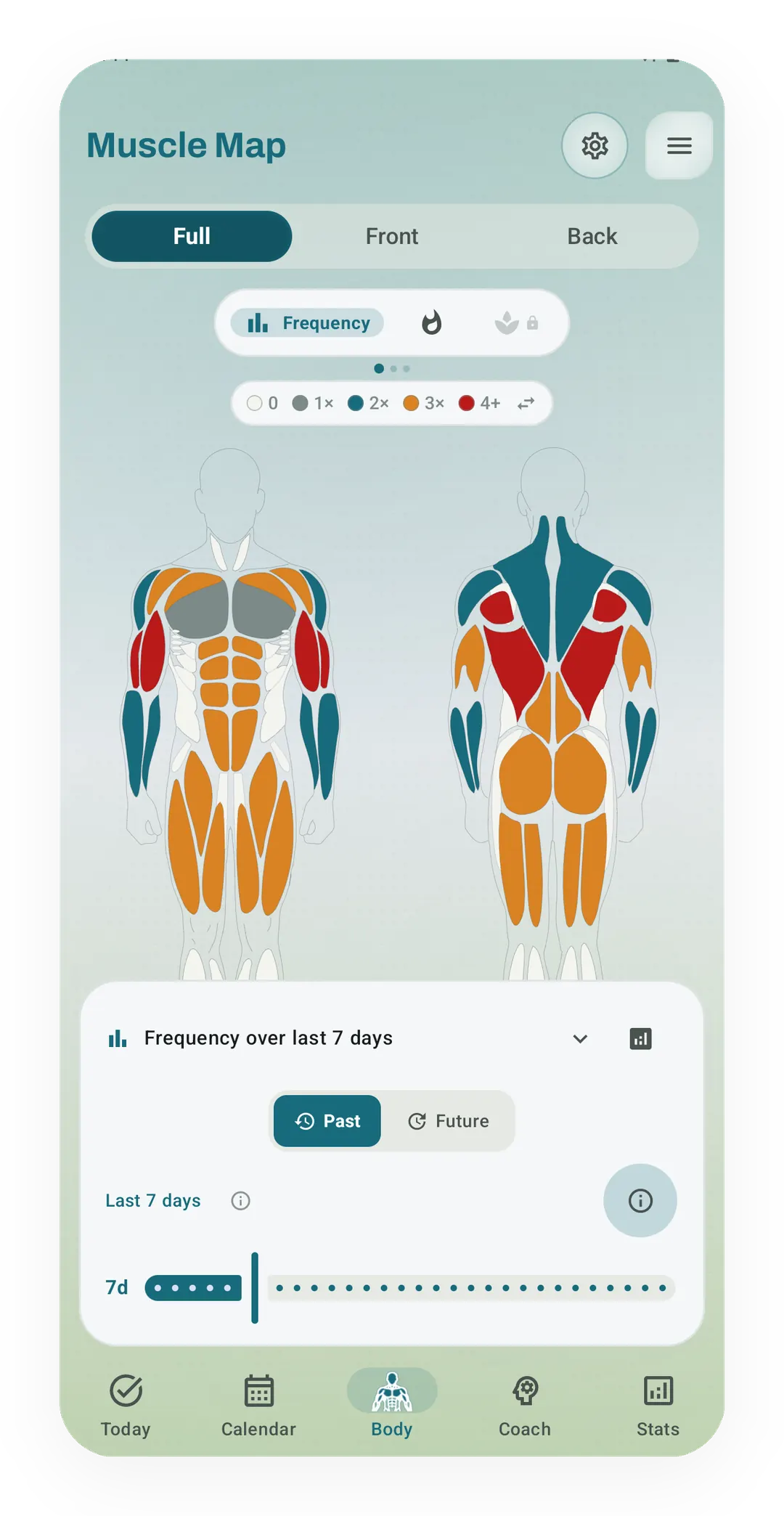 Open full-size image ↗
Kinoku's muscle map in Frequency mode
Frequency mode colors each muscle, front and back, by how many times it was trained in the chosen window, from 0 up to 4 or more. It is one of the two free modes.
One of the apps on this page
Kinoku is free to install
Core tracking works offline, with no account. An export from the app you use today can come along.
Android only for now, with an iPhone version in the works. Some depth is paid, and the pricing page says which parts.
Related features
Frequency and training-volume maps are free. Pro adds recovery estimates, readiness context, and exercise picks.
A body shape colored by this session's effort per muscle, with the top 3 muscles shown as pills.
Open a lift in Stats and a plain label says if it is progressing, holding steady, or slipping, with a flat-zone band on the chart. The label is free. Pro adds ideas for a stuck lift (options, never orders), an all-lifts dashboard, and a Coach card. It stays quiet when the data is thin.