

Best JEFIT alternatives (2026)
JEFIT alternatives compared on ads, free plans, accounts, custom exercises and charts: FitNotes, Kinoku, Hevy, Boostcamp and Strong, with sources.
FitNotes suits a free Android gym log with no ads or account; Kinoku adds unlimited custom exercises, runs and a free Wear OS app. Boostcamp suits ready-made programs.
At a glance
| App | Best for | Better than JEFIT at | Main trade-off |
|---|---|---|---|
| Boostcamp | Lifters who want ready-made coach programs instead of building their own | A free library of 11,000+ programs with no ads, in its listing's words | An account to start; Strength Score and the volume heatmap are in Pro |
| FitNotes | Android lifters who want a free gym log with progress graphs and no account | No ads at any level, and no account; JEFIT keeps ad-free for Elite | Android only; the pages checked do not list a watch app |
| Hevy | Lifters who want JEFIT's cross-platform reach with a friends feed | Seven free custom exercises to JEFIT's three, plus Apple Watch and Wear OS | An account before use, and four free routines |
| Kinoku | Android lifters who want no ads, no account and unlimited custom exercises | Unlimited custom exercises and routines, free stats, run tracking and Wear OS | Android only for now, with no browser view |
| Strong | iPhone and Apple Watch lifters who want a quiet log with no ads | No ads, ever, in its help centre's words, and an Apple Watch app | An account before use, three free templates, and full chart access under PRO |
Publisher disclosure
Kinoku, made by Dreamsoft Works, publishes this page and appears in the list. Competitor sources were checked on October 14, 2026. Device observations keep their original dates; the Kinoku 1.5.0 check is separate. Apps are alphabetical, with no score or paid placement.
Quickstart
JEFIT (a workout logger) combines a large exercise library, training plans and a community. If ads are the reason you want to leave, FitNotes, Kinoku, Boostcamp and Strong all publish an ad-free option. The useful question is what else you need to keep.
Choose Kinoku for an Android log with no ads, no account and no cap on custom exercises or routines. Free stats, a muscle map, run tracking and Wear OS support come with it. There is no iPhone app yet, and no browser log or friends feed.
FitNotes suits a free gym notebook with progress graphs. Boostcamp suits lifters who want a coach’s program, while Hevy adds a friends feed and a web app. Strong suits an iPhone and Apple Watch split that fits three free templates. The apps below are listed in alphabetical order.
Why lifters look for a JEFIT alternative
JEFIT is a big planner with exercise video, ready programs and a browser view, and its own pages and our test name four things that send lifters elsewhere.
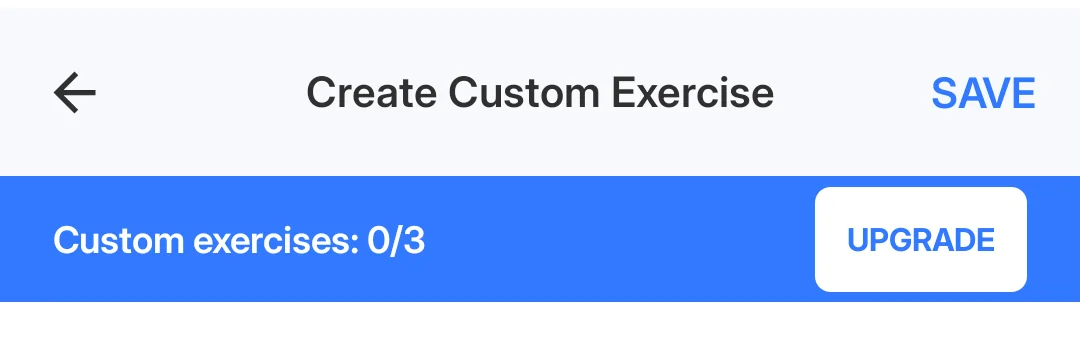
- Three free custom exercises: The Create Custom Exercise form in JEFIT 17.4.4 opened with “Custom exercises: 0/3” and an Upgrade button, before we had made one.
- Ads unless you pay: The Elite page lists an “Ad-free experience” as a paid benefit, which is how JEFIT describes its free plan.
- Analytics behind Elite: The same page lists “Advanced analytics and tracking” and “Watch app support” under Elite, at $12.99 a month or $69.99 a year.
- An account first: Get Started ran a questionnaire and an Elite offer, then a sign-up screen with no skip path.
The five apps below each answer at least one of those.
Which JEFIT alternatives put no cap on custom exercises?
Custom exercises matter if your gym uses machines or lift names missing from the library. A custom exercise is your own entry; a routine is a saved group of exercises.
- Kinoku: Custom exercises and routines are unlimited on the free plan, next to a library of 1,300+ exercises with muscle data.
- Hevy: Version 3.1.12 stopped at seven custom exercises in our September test. This is a dated observation, not a new test of today’s build.
- FitNotes: Its pages describe free use but state no numeric custom-exercise cap. An unstated limit is not proof of unlimited use.
- Boostcamp and Strong: Their pages do not give a custom-exercise figure. Boostcamp’s no-cap claim refers to programs; Strong’s three-template limit refers to saved workouts.
Side by side
Each cell comes from the app’s own pages or from our emulator session, and “Not stated” marks a feature no page we opened mentions.
| App | Free custom exercises | Ads | Account required | Charts on the free plan | Watch app |
|---|---|---|---|---|---|
| Boostcamp | Not stated | None (“No ads”) | Yes (“create an account”) | Strength Score and heatmap in Pro | Not stated |
| FitNotes | No numeric cap stated | None | No | Progress graphs [33] | Not stated |
| Hevy | 7 in our test | Not stated | Yes, in our test | Not stated | Apple Watch and Wear OS |
| Kinoku | Unlimited | None | No account | Yes, stats and muscle map | Yes, Wear OS |
| Strong | Not stated | None (“no ads, ever”) | Yes (“prompted to sign up”) | “Access to all Charts” under PRO | Apple Watch; Wear OS not mentioned |
Each app, in its own words
Boostcamp
Best for: Lifters who want ready-made coach programs instead of building their own.
Boostcamp is the app for a JEFIT user who came for the ready programs more than for the log.
- What it does well: The homepage leads with 11,000+ programs in a free tracker, from coaches including Eric Helms and Cody Lefever. The Play listing says “The library is free. No ads.” and “Fork any program, or build your own with no cap.”
- What its pages say about limits: Pro is where Strength Score, the per-muscle heatmap, personalized programs and the 20+ exclusive coach programs live, and the homepage says to “create an account” first. Its pages state nothing about custom exercises.
- Where it is the better pick: A JEFIT user who wants a coach’s program with no ads, and does not mind an account.
- Where Boostcamp differs: The volume heatmap sits in Pro, and its pages do not mention a watch app or a web app. Official listing: Google Play.
FitNotes
Best for: Android lifters who want a free gym log with progress graphs and no account.
FitNotes is an Android gym notebook by an independent developer, James Gay.
- What it does well: Its homepage calls it “A clean, simple, powerful workout tracking app only available on Android.” It logs a set in a few taps and keeps the data on the phone: the privacy policy says all workout data is stored locally on your device.
- What its pages say about limits: The homepage says it is free with no ads, and its privacy policy says no account is required. The pages checked state no numeric custom-exercise cap.
- Where it is the better pick: An Android lifter who wants a gym log, progress graphs and local storage with no sign-up.
- Where FitNotes differs: It is Android only, and the pages checked do not list a watch app. Its help section does describe progress graphs, including weight, reps and volume [33]. Official listing: Google Play. Versus page: Kinoku vs FitNotes.
Hevy
Best for: Lifters who want JEFIT’s cross-platform reach with a friends feed.
Hevy is a social workout tracker that, like JEFIT, runs on both phone platforms and builds a community into the log.
- What it does well: Its homepage calls Hevy a free workout tracker for iOS and Android, names Apple Watch and Wear OS for logging from the wrist, and offers a web app for building routines and reviewing progress. Friends are the point: the homepage says “Build routines and track progress with friends.”
- What its pages say about limits: In our test, Hevy 3.1.12 stopped at seven custom exercises and at four routines, each with an upgrade sheet, and the first screen asked for sign-up or log-in with no skip path.
- Where it is the better pick: A JEFIT user who wants a community and a watch app without paying, and for whom seven custom exercises is enough.
- Where Hevy differs: An account comes before the first set, and the free plan has the limits noted above. Its homepage links to the web app at hevy.com. Versus page: Kinoku vs Hevy. Official listing: Google Play.
Kinoku
Best for: Android lifters who want no ads, no account and unlimited custom exercises.
Kinoku is a free Android app for lifters and runners with the whole record kept on the phone.
- What it does well: Custom exercises have no cap at any tier, next to a library of 1,300+ exercises with muscle data. The stats screen, calendar heatmap and muscle map are free, there are no ads on any plan, and nothing needs an account. A free Wear OS app logs sets on the wrist, and the importer supports the JEFIT CSV layout described below.
- What its pages say about limits: Core logging stays free. Pro adds deeper analytics, readiness and the full run dashboard. Earned Pro time can expire; your free log and saved workouts remain.
- Where it is the better pick: An Android lifter who builds custom routines and wants no ads or account. Runs and gym sessions can share one history, while free stats show progress.
- What Kinoku does not do: Kinoku runs on Android only for now, with no web app, no iPhone app yet, no community feed and no Kinoku cloud sync between phones. Kinoku on Google Play.
Strong
Best for: iPhone and Apple Watch lifters who want a quiet log with no ads.
Strong is an early phone gym log with a set table and no social feed.
- What it does well: The help centre names apps “for iPhone (including Apple Watch) and Android” and adds, in the same article, “And no ads, ever.” Workout data exports to a spreadsheet-friendly CSV.
- What its pages say about limits: The free version stops at three workout templates, unlimited ones need Strong PRO, and “Access to all Charts” is a PRO feature. All users are prompted to sign up before using the app.
- Where it is the better pick: A JEFIT user on an iPhone who wants no ads and an Apple Watch app, and whose split fits three templates.
- Where Strong differs: Full chart access needs PRO, and an account comes first. That wording does not establish that every individual chart is paid. Official listing: Google Play. Versus page: Kinoku vs Strong.
Moving your JEFIT history
Kinoku supports a JEFIT CSV layout through its generic importer, which reads tables stored as text. The parser recognizes exercise columns and can split slash-separated rep counts into sets. That is support for a file layout, not a live link to your JEFIT account.
We found no export control in the JEFIT 17.4.4 screens we checked on September 11, 2026. This page therefore gives no current in-app export steps, and we have not tested a full transfer from a real JEFIT account.
If you already have a file, keep the original. Use Kinoku’s import preview to check dates, exercise names, units and set counts before saving. Review one known workout after import. Import History offers Undo for the imported batch.
The pages checked for FitNotes, Hevy, Strong and Boostcamp do not describe a JEFIT importer. We leave their support unconfirmed until a source or a dated test establishes it.
When is JEFIT Elite still the better pick?
Staying can make sense if you use JEFIT’s existing plans, community and synced history. Its Elite page lists ad removal, advanced analytics, exercise videos and watch support. A cheaper app is not much help if it loses the workflow you use each week.
JEFIT’s blog also describes offline entry followed by sync across Android and iOS. Kinoku has no iPhone app yet and no account-based sync between phones. Hevy is worth checking if a friends feed and browser access matter: its homepage links to a web app and also lists exercise videos.
For an Android lifter whose main needs are no ads and no account, FitNotes and Kinoku are options. Kinoku explicitly leaves custom exercises and routines unlimited on its free plan.
How this list was checked
Competitor web sources were checked on October 14, 2026. The source notes preserve the dates of the September device observations. We did not retest those competitor builds for this update.
We also checked Kinoku 1.5.0, build 40, on an Android 16 emulator on October 14. With airplane mode on, a fresh install let us create a custom exercise, log a set and save a routine without an account or purchase. The workout remained after closing and reopening the app.
Saving the first routine earned one day of Pro. Finishing that workout and exporting its files happened with earned Pro active. Code checks confirm those actions are free; this was not a limit stress test. The offline comparison has the screenshots and the full test scope.
No app paid for a place, and the alphabetical list leaves unconfirmed features marked as unknown.
Frequently asked questions
The questions JEFIT users ask before switching, answered from the apps’ own pages and our tests.
How many custom exercises does JEFIT allow for free?
Three in JEFIT 17.4.4, tested on September 11, 2026. Its Create Custom Exercise screen showed 0/3 beside an Upgrade button. Kinoku has no cap on custom exercises or routines. Hevy 3.1.12 stopped at seven custom exercises in our September test. FitNotes, Strong and Boostcamp do not state a numeric custom-exercise cap on the pages checked.
Which JEFIT alternatives have no ads?
FitNotes, Kinoku, Boostcamp and Strong offer ad-free use. FitNotes and Strong state that in their own pages; Boostcamp states it in its Play listing. Kinoku shows no ads on either plan, while JEFIT lists ad removal under Elite. The Hevy sources quoted here do not state an ad policy, so we leave that point open.
Which JEFIT alternatives work without an account?
FitNotes and Kinoku. FitNotes’ privacy page says registering an account is not required, and Kinoku never asks for one. JEFIT 17.4.4 reached a sign-up screen with no skip path in our test, and Hevy 3.1.12 opened on one. Strong’s account article has all users prompted to sign up before using the app, and Boostcamp’s homepage says to create an account before choosing a program.
Which of these apps gives you charts for free?
FitNotes is free to use, and its help section describes progress graphs. Kinoku includes stats, a calendar heatmap and a muscle map for free. JEFIT lists advanced analytics under Elite, Strong lists full chart access under PRO, and Boostcamp lists Strength Score and its volume heatmap under Pro. These paid features do not prove that every chart is paid.
Can I move my JEFIT history to another app?
Kinoku supports a JEFIT CSV layout, but we have not verified a full transfer from a current JEFIT account. We found no export control in the version tested in September. If you have a file, keep a copy and check the import preview for dates, units and sets before saving. The other apps checked do not describe a JEFIT importer.
Which JEFIT alternatives have a web app?
Hevy does. Its homepage links to hevy.com, where you can create routines, review exercise progress and view friends’ workouts. Kinoku has no browser app. The other alternatives’ sources quoted here do not establish browser logging, so we do not claim it for them.
Which of these apps have a watch app?
Hevy’s homepage names Apple Watch and Wear OS. Strong’s help centre names an Apple Watch app and does not mention Wear OS. Kinoku has a free Wear OS app. JEFIT lists watch app support under Elite without naming a watch platform on that page. FitNotes’ and Boostcamp’s pages do not mention a watch, so this page does not claim one for them.
Is JEFIT Elite worth paying for instead of switching?
It can be if you use its plans, community and synced history. Elite lists ad removal, advanced analytics, exercise videos and watch support. The page prints $12.99 a month or $69.99 a year; check your store offer before buying. For an Android log with no ads or sign-up, FitNotes and Kinoku are worth trying first.
Which JEFIT alternative works offline?
JEFIT’s own blog says it allows offline entry and syncs across Android and iOS, and in our test it saved a set with flight mode on. Strong 6.2.4 did the same in our test. Kinoku’s core tracking works offline by design, since no Kinoku server holds the record. FitNotes’ privacy policy says the data is stored locally on your device. Boostcamp’s and Hevy’s pages do not state offline logging in a sentence we can quote here.
Which app is closest to JEFIT in feel?
Hevy is a candidate if you mean a friends feed and access on both phone platforms. Its homepage also links to a web app. That is a feature comparison, not a measured rating of how the apps feel. Our September Hevy test found seven free custom exercises and four routines; check those limits before moving a large split.
Where is my data stored in each app?
JEFIT’s privacy policy allows for the information to be uploaded to the company’s servers, or kept on your device. FitNotes’ policy says the data is stored locally on your device. Kinoku keeps the record in a local database on the phone, with Android backup and a ZIP backup as the copies. Hevy’s, Strong’s and Boostcamp’s pages that we could open do not state where the log lives.
What does Kinoku not do that JEFIT does?
Kinoku has no iPhone app yet, no browser log or community feed, and no Kinoku cloud sync between phones. It suits an Android lifter who wants a local record with no ads or sign-up. Custom exercises, routines, stats and Wear OS support are free, and runs can share the workout history; deeper analytics belong to Pro.
Related pages
- Kinoku vs JEFIT: The account, the ads and the charts, in detail.
- Best Hevy alternatives: Loggers with room for more than four routines.
- Best Strong alternatives: Loggers with room for more than three templates.
- Best FitNotes alternatives: Apps for FitNotes users who want runs, a watch or programs.
- Best free workout tracker apps for Android: Free plans across Google Play’s logging apps, compared.
- Hevy vs JEFIT: JEFIT set against Hevy, one of the apps on this list, on free caps and prices.
- Best Fitbod alternatives: Where JEFIT’s AI plan sits among apps that build workouts or run named programs.
Which one fits you
- Choose Boostcamp if you came to JEFIT for its ready programs and would rather pick from a free library of 11,000+, with an account.
- Choose FitNotes if you want a free Android gym log with progress graphs, no ads and no sign-up.
- Choose Hevy if you want an app on iPhone, Android, both watch platforms and the desktop, with a friends feed, and seven free custom exercises are enough.
- Choose Kinoku if you want unlimited custom exercises and routines on Android, with no ads or account.
- Choose Strong if you train on an iPhone or an Apple Watch, you want a quiet log with no ads, and three free templates cover your split.
Test record
Tested September 11, 2026
- Environment
- Android Studio Pixel phone emulator Kinoku_Phone_Play, API 36, Android 16
- JEFIT
- Version 17.4.4 (version code 2093), installed from Google Play. Official listing
- Hevy
- Version 3.1.12 (version code 3289233), installed from Google Play. Official listing
- Strong
- Version 6.2.4 (version code 602006), installed from Google Play. Official listing
- Kinoku
- Version 1.2.0 (version code 30), a test build installed outside Google Play. Official listing
How this page is checked. Every fact about another app on this page comes from a page that app publishes, which we could open and quote on October 14, 2026, or from a dated emulator test named in that source's note. The sources, with the exact sentence each fact rests on, are listed just above. Every Kinoku fact is tied to the shipping app's code. The page carries no score; the apps are grouped by what their own pages say. If a fact here has gone stale, the support page is the fastest way to tell us.
Test evidence
What the tested builds showed
 Open full-size image ↗
JEFIT's free custom-exercise limit, in its own words
Cropped emulator capture from September 11, 2026. The Create Custom Exercise form in JEFIT 17.4.4 opened with this bar on a free account, before we had made a single exercise. The Upgrade button next to it opens the Elite Hub.
One of the apps on this page
Kinoku is free to install
Core tracking works offline, with no account. An export from the app you use today can come along.
Android only for now, with an iPhone version in the works. Some depth is paid, and the pricing page says which parts.
Related features
1,300+ built-in exercises with muscle data and unlimited custom moves are free. Pro adds custom form photos and assisted sorting.
Charts per exercise, PRs, your best one-rep estimate, volume trends, and date filters. Every exercise type gets a chart that fits it: Best, Total, and Avg Time for holds, Best and Total Reps for rep work, and Best and Total Distance for distance work, not just weight charts.
Frequency and training-volume maps are free. Pro adds recovery estimates, readiness context, and exercise picks.